T3Desk for Windows 10 - Full description
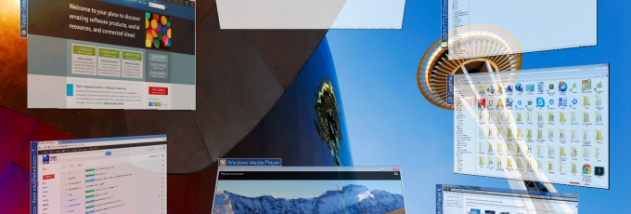
T3Desk is a desktop and application manager that presents open windows as movable 3D objects. It is intended for people who want an alternative to switching among flat, overlapping windows, or who prefer arranging minimized applications spatially. The windows can be made transparent, helping keep other work visible while they sit on the desktop.
Users can move, swivel, flip and zoom the 3D windows to arrange them or inspect their contents. Display options include the starting angle and distance, transparency, animation and transition effects. These controls let users choose how windows appear and move, rather than applying only one fixed 3D layout.
T3Desk also provides configurable hotkeys and sound options. Hotkeys offer a keyboard-based way to invoke its window-management actions, while display and animation settings can be adjusted to suit a preferred desktop layout. The program is designed to use relatively few system resources compared with similar 3D desktop tools.
The utility can be used to keep several open applications visually separated, bring a particular window into view, or add spatial organization to a crowded desktop. Its 3D presentation changes how windows are arranged and accessed; it is an alternative desktop workflow rather than a replacement for the applications themselves.
T3Desk Standard is freeware. The program requires DirectX for dialog effects, as well as the GDI+ and Visual C++ 2008 runtime components. These dependencies need to be available on the system for the relevant functions to work.