Undo It
... the download page for "Undo It," a cutting-edge Windows 10 software developed by IpCamSoft. Designed to empower users with seamless control over their digital actions, ...

ThGCube displays personal pictures on a rotating cube on the desktop. Users choose the folder containing their images and adjust the cube's size, position, and rotation speed to suit their desktop layout. A new picture is integrated into the cube every few seconds, creating a changing photo display without manual advancement. It is a compact visual utility for keeping selected images in view, rather than a photo editor or a full-screen slideshow manager. The program is offered as demo software and supports Windows 10.
| Author: | ThGSoft |
| License: | Demo |
| Price: | $10.00 |
| Released: | Oct 18, 2020 |
| File size: | 2.20 MB |
| Downloads: | 243 |
| Keywords: | ThGCube, Cube, rotating picture slideshow, Desktop, Rotate, photo cube software, Photo Cube, ThGSoft, desktop photo display, Windows 10 software, desktop cube, rotating photo cube, photo slideshow, x64 application, desktop cube utility, Desktop Cube, Photo Slideshow, personal photo display |
| Author URL: | https://www.thgsoft.ch/ |
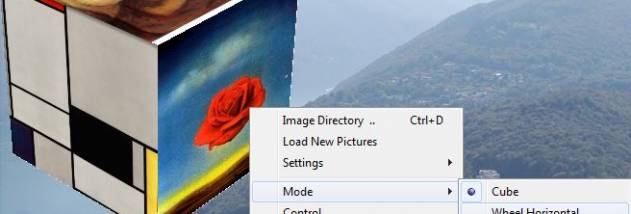

ThGCube is a desktop display utility that presents personal photos on a rotating cube. It is intended for people who want a changing image display on their desktop rather than a conventional static wallpaper or a full-screen slideshow. The cube uses pictures from a folder chosen by the user, making it possible to show a personal collection without moving images into a separate library.
The program lets users set the cube's size and position, so it can be adjusted to fit around other desktop content. Rotation speed is configurable as well, allowing the display to move at a pace suited to its placement and use. These controls make the cube adaptable as a decorative desktop element or as a compact way to keep selected photographs visible while working.
ThGCube adds a new picture to the cube every few seconds. To choose what appears, users specify the directory containing their preferred images; the program then draws from that location as the display updates. Keeping the images together in a selected folder provides a straightforward way to change the selection: add or remove pictures from the collection, or select a different directory for another set.
The rotating format is suited to personal photos, a small collection of favorite images, or pictures that benefit from being visible at a glance. Its adjustable placement and scale help it fit into a desktop layout, while automatic image changes provide variety without requiring manual advancement. It is a simple visual utility rather than a photo editor or a comprehensive slideshow organizer.
ThGCube is offered as demo software. Its stated Windows support includes Windows 10, as well as earlier Windows releases; Windows 11 support is not established here. The main setup choices are the image folder and the cube's size, position, and rotation speed.