Titan FTP Server
Titan FTP Server is a Windows file-transfer server for organizations and individuals who need to exchange files over networks. It supports FTP and SFTP and ...

Titan FTP Server x64 is a Windows file-transfer server for organizations and home users who need to exchange files with employees or external partners. It supports FTP and SFTP and can run multiple server configurations on different IP address and port combinations. Administrators manage access with file and folder permissions, disk quotas, and configurable upload/download ratios. A browser-based interface adds HTTPS file exchange and drag-and-drop uploads without requiring users to install a transfer client.
| Author: | South River Technologies, Inc. |
| License: | Trialware |
| Price: | $599.95 |
| Released: | Nov 24, 2022 |
| File size: | 163.00 MB |
| Downloads: | 425 |
| Keywords: | ftp server x64, browser file sharing, x64 download, Enterprise-level FTP, ftp server software, ftp server with quotas, x64 software, ftp access management, Windows 10 compatibility, Secure File Transfer, x64 FTP, sftp server, x64 upload, Titan FTP Server, secure file transfer server, x64 share file, South River Technologies, x64 file transfer |
| Author URL: | https://titanftp.com/ |
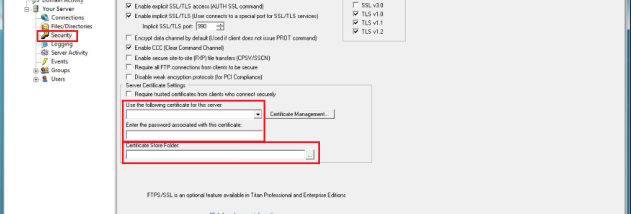

Titan FTP Server x64 is a Windows file-transfer server for organizations and home users who need to exchange files with employees, customers or external partners. It supports FTP and SFTP connections and runs as a multithreaded application, allowing multiple servers to operate at the same time on different IP address and port combinations. This setup can separate services or user groups while keeping their transfers under centralized administration.
An administrative interface provides controls for configuring servers and managing access. Permissions can be assigned to files and folders, helping administrators determine which users can view or change particular content. Disk quotas limit the storage available to users, while configurable upload and download ratios let administrators set conditions for sharing. These controls are useful when a server is open to multiple users and needs predictable storage and transfer policies.
The included web interface gives users a browser-based way to exchange files without installing a dedicated transfer client. It supports HTTPS encryption for web sessions and file transfers, and its drag-and-drop workflow can send multiple files or folders at once. Because significant processing takes place on the server, the web client can provide access from Windows, Linux and Macintosh computers as well as supported mobile browsers. Browser access can simplify file exchange with partners who do not use the organization's usual desktop software.
The server can support routine business transfers, controlled file sharing between teams, and exchanges with outside parties. Separate server configurations on distinct IP and port combinations can help organize different transfer services, while folder-level permissions, quotas and transfer ratios provide ways to manage how shared files are accessed and stored. The browser interface can also reduce the need to support several client applications for occasional users.
Titan FTP Server x64 is commercial trialware for 64-bit Windows, including Windows 10 and Windows 11. It is intended for administrators who need server-side control over file-transfer access and sharing; users connecting through the web interface can use a browser rather than installing a separate client. FTP and SFTP provide server connection options, while HTTPS protects the browser-based interface. The software is suited to systems where ongoing file exchange and centrally managed permissions are required.