Batch Extract Images from Office
Welcome to the official website for "Batch Extract Images from Office," a powerful software developed by 4dots Software exclusively for Windows 10 users. This innovative tool ...

Total CAD Printer is a Windows utility for printing CAD drawings in DXF, DWF, DWG and CGM formats. It can automate batch jobs, assign projects to specific printers and divide large drawings for output on a smaller plotter. Scale and print-quality settings help control drawing size and ink use, while format filters make files easier to find. It is designed for users familiar with CAD printing workflows.
| Author: | CoolUtils Development |
| License: | Trialware |
| Price: | $149.90 |
| Released: | Oct 5, 2026 |
| File size: | 21.00 MB |
| Downloads: | 23 |
| Keywords: | cad printing software, large pr, print dwg files, CAD printing software, print DWG, batch, automated CAD printing, DXF DWF DWG CGM printing, batch cad printing, printer, download Total CAD Printer, multiple printer assignment, dxf printer utility, Total CAD Printer, Total CAD Printer free download, cad plotter software, print CAD, CAD printer, draft, scale, print cgm files |
| Author URL: | https://www.CoolUtils.com/TotalCSVConverter |


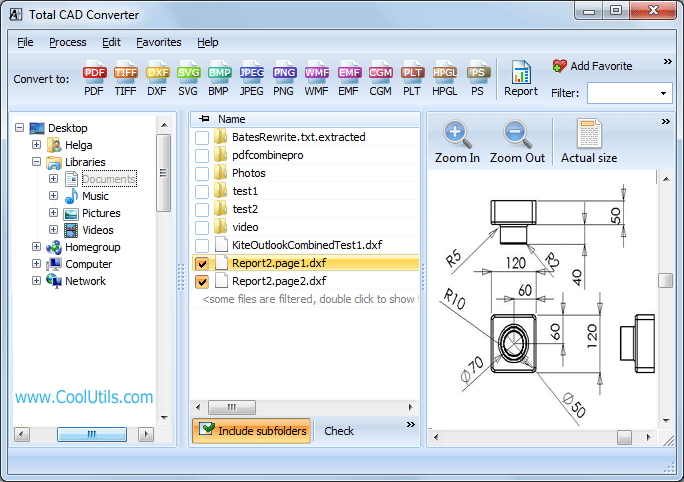
Total CAD Printer is a Windows application for preparing and sending CAD drawings to printers or plotters. It is intended for CAD users who need to print files in several supported formats or manage output across multiple devices. The program supports DXF, DWF, DWG and CGM files, bringing common CAD printing tasks into a single workflow. Its file browser and format filters help users locate relevant drawings, while familiarity with CAD printing concepts is useful when setting up output correctly.
The software can automate batch printing, so multiple drawings can be processed without opening and printing each one individually. Users can assign projects to particular printers, which is practical when devices have different paper sizes or roles. For example, a set of drawings can be routed across available printers rather than handled as one manual job. This printer assignment also helps coordinate work when several projects need to be printed at the same time.
Large drawings can be divided for printing on a smaller plotter, allowing a large output to be assembled from smaller sections instead of requiring a wide-format device. Print scale settings help control the relationship between the drawing and its paper output, while print-quality options let users choose settings appropriate to the job. Lowering quality for working copies, for instance, can help conserve ink; more demanding output can use settings suited to presentation or reference prints. These controls are especially relevant when printing technical drawings where size and legibility matter.
The straightforward interface centers on browsing for files, filtering the view by format and configuring print jobs. This keeps routine tasks accessible, though users still need to understand their drawings and intended output to select appropriate scale, printer and quality settings. The workflow is suited to offices, studios and workshops that regularly print CAD projects, including situations where multiple devices are available or a large drawing must be produced with smaller equipment.
Total CAD Printer is trialware for Windows, including Windows 10 and Windows 11. It also supports several older Windows releases. It is a dedicated printing utility rather than a CAD design or editing tool: its purpose is to help organize and automate physical output from supported CAD files. A trial allows users to assess whether its printer routing, batch workflow and scale controls fit their printing needs.