TouchPro x64 for Windows 10 - Full description
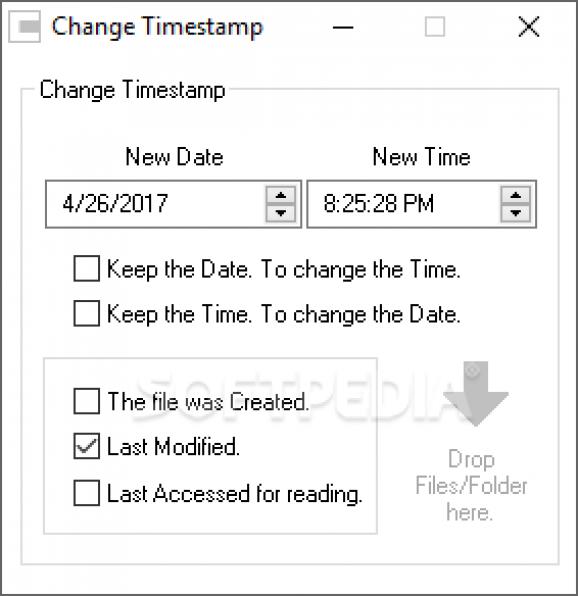
TouchPro x64, also known as Change Timestamp, is a Windows utility for changing the date and time metadata attached to files and folders. It is intended for users who need to correct, organize, or standardize timestamps without editing the files themselves. The program can adjust creation, modification, and last-access times, giving users control over several kinds of date information commonly shown in file managers.
The utility supports changes to individual files and folders as well as batch processing for multiple items. Batch operations are useful when a collection needs consistent dates, such as photos gathered from different devices, documents being organized into an archive, or files moved between systems. Rather than editing each item separately, users can apply timestamp changes to a group, reducing repetitive work. The available controls allow the selected date and time to be set with precision down to the second.
TouchPro x64 focuses on metadata rather than file contents. Changing a timestamp does not rewrite the content of the selected file, so the utility is suited to administrative and organizational tasks where the data itself should remain untouched. The interface is designed to make the main operation straightforward: select the relevant files or folders, choose which timestamp values to change, and apply the desired date and time. Its narrow focus keeps it useful as a dedicated alternative to a broader file-management application.
Typical uses include correcting dates on scanned or imported material, arranging personal photo and document collections, and bringing timestamps into line across project files. It can also help with archival workflows where the recorded dates need to reflect a chosen timeline. Because creation, modification, and access times are distinct metadata fields, users can select the relevant timestamp rather than treating all file dates as one value.
TouchPro x64 is freeware from OGA. It is offered for Windows 10 and Windows 11, as well as older Windows releases, with 32-bit and 64-bit support indicated for several of those systems. The utility is a small download and is intended for local timestamp adjustments; it is not a file-content editor or a general-purpose metadata catalog. Users should check the selected items and chosen date fields before applying a batch change, especially when maintaining an archive or other carefully organized collection.