UWPSpy for Windows 10 - Full description
UWPSpy is an inspection tool for developers working with Universal Windows Platform applications. It exposes details of an app's interface and runtime state, helping developers investigate how a UWP app is structured and diagnose problems that are difficult to spot from the finished screen alone. It is intended for hands-on analysis during development and debugging rather than for creating an app from scratch.
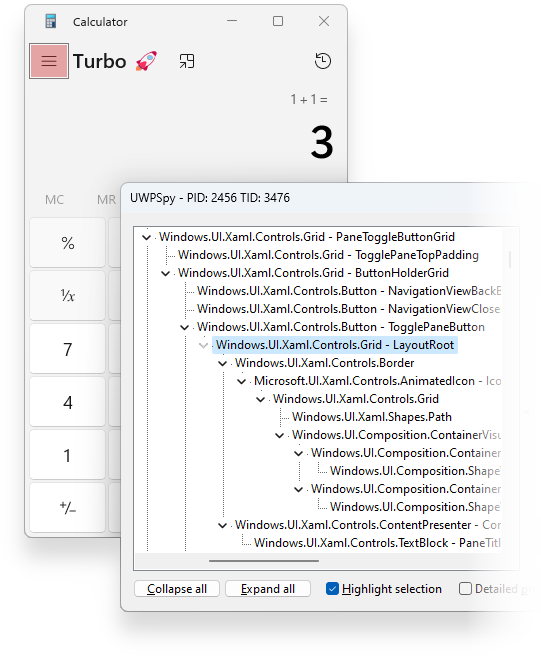
The visual tree view lets developers examine the hierarchy of interface elements and see how controls are arranged. Inspecting layout properties can help trace a misplaced or incorrectly sized element to its place in the app structure. This is useful when comparing the intended design with what the running application actually displays, and when narrowing down which part of a complex screen needs attention.
UWPSpy can monitor changes in real time, so developers can observe how the interface responds as the app changes. That feedback supports an iterative workflow: make a change, inspect its effect, then continue refining the relevant UI. The tool also provides a way to inspect data bindings, helping developers follow how displayed values relate to app data, and resource usage, which can be examined when investigating how an application uses its resources.
These inspection capabilities can support debugging, interface refinement and performance analysis in UWP projects. A developer might use the visual tree to locate a layout issue, review bindings when content does not appear as expected, or monitor the app while testing a change. The combination of structural and runtime inspection can make it easier to understand behavior in an existing application as well as during active development.
UWPSpy is open-source software from Ramen Software and is intended for Windows 10 and Windows 11 systems. It focuses specifically on UWP apps, so it is most relevant to developers and technical users working with that application platform. Its role is to provide diagnostic insight; changes to the application itself are made through the developer's normal project and development workflow.