VBRhapsody for Windows 10 - Full description
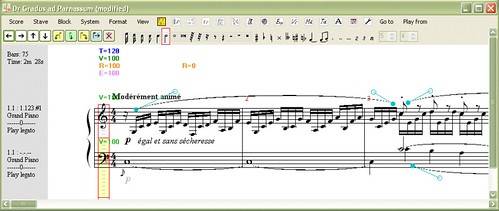
VBRhapsody is a music composition and editing program for people who want to create scores using standard musical notation. It provides a digital workspace for entering and changing musical material, then printing the finished score. The program also connects score writing with MIDI instruments, so composers can hear their work and use an instrument as an input device.
Scores can be entered and edited directly in the notation workspace. This makes VBRhapsody suitable for drafting original music, revising passages and preparing written parts for use away from the computer. Once a score is ready, its print function produces a paper copy in standard notation, useful for rehearsal, study or performance. The workflow focuses on working with a written score rather than only arranging audio recordings.
MIDI playback lets users listen to their scores through a MIDI instrument, providing an audible check alongside the printed notation. A MIDI instrument can also help enter musical data, offering an alternative to entering notes solely through the computer. These capabilities support a cycle of composing, listening, making edits and printing, with the score remaining the central form of the work.
VBRhapsody can serve composers developing a piece, musicians preparing written music, or students working with notation and MIDI. Its combination of score editing and instrument-based playback can be useful when checking whether a passage works as written or capturing ideas played on an instrument. It is a focused composition and notation tool, not a general-purpose audio editor.
The program is freeware and is available for Windows, including Windows 10. Its earlier history began with a version for the Acorn Archimedes, while the PC version was written in Visual Basic .NET. The provided compatibility information covers Windows releases through Windows 10; it does not establish support for Windows 11.