Volume Control
Discover the ultimate audio management tool with "Volume Control," developed by the innovative ... are the days of fumbling through complex settings; Volume Control offers a sleek, intuitive interface that allows you ...

VolControl is a lightweight Windows utility that assigns separate keyboard shortcuts to raise and lower system volume. Users can set the two hotkey combinations and adjust audio while working in other applications, without opening sound settings. An optional on-screen meter shows the current volume level, providing visual feedback as it changes. The program focuses on quick volume control rather than broader audio management and is freeware.
| Author: | Boredom Software |
| License: | Freeware |
| Price: | FREE |
| Released: | Feb 20, 2021 |
| File size: | 3.70 MB |
| Downloads: | 268 |
| Keywords: | volume down shortcut, volume up, user-friendly interface, audio management, set hotkey combination, Volume control, system sound control, volume up shortcut, volume hotkey utility, set, keyboard volume control, on-screen volume meter, combination, hotkey, Boredom Software, system tray application, customizable hotkeys, volume down |
| Author URL: | https://www.boredomsoft.org/ |
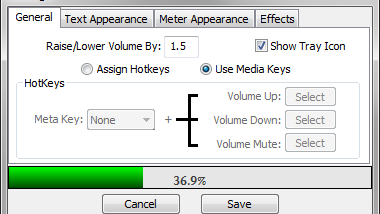

VolControl is a small Windows utility for controlling system volume with keyboard shortcuts. It is intended for people who want quick access to volume changes without reaching for speaker controls or opening Windows sound settings. The program registers two user-defined hotkey combinations: one to raise the volume and one to lower it.
After choosing the key combinations, users can adjust the volume from the keyboard while working in other applications. Separate shortcuts for increasing and decreasing the level make the controls easy to remember and use, whether changing audio during playback or making a quick adjustment in a quiet environment.
An optional on-screen volume meter provides a visual indication of the current level as it changes. This can help when the computer's speakers or headphones do not have visible controls, or when the Windows volume indicator is not convenient to check. The meter supplements the keyboard commands rather than replacing them.
VolControl focuses on these basic controls, making it suited to users who prefer a lightweight shortcut utility over a broader audio-management application. It is freeware and is designed for Windows. Its published compatibility includes Windows 10 and earlier Windows releases; Windows 11 compatibility is not established here.