Wave Ripper
Wave Ripper is a desktop audio CD extraction utility from SSuite Office Software. It copies selected tracks from an audio CD ...

Waveinfo is a lightweight Windows utility for inspecting WAV files. It reports file size, duration, sample rate, bit depth and channel count, and can examine multiple files in a batch. Users can also review WAVE structure, including RIFF data and format descriptors. Its organized display and customization options help audio professionals and enthusiasts check specifications without opening a full audio editor.
| Author: | Eugene Muzychenko |
| License: | Freeware |
| Price: | FREE |
| Released: | Jul 7, 2025 |
| File size: | 82 kB |
| Downloads: | 134 |
| Keywords: | batch wav analysis, WAVE, waveinfo free download, chucnk, waveinfo, wav file information, audio file analyzer, metadata, audio analysis, descriptor, wave file metadata, riff chunk viewer, Eugene Muzychenko, WAV information, audio editing tool, format descriptor, sound visualization, waveform, download waveinfo, software, RIFF, wav sample rate checker, wave data size, wav metadata viewer, waveform display |
| Author URL: | https://software.muzychenko.net/en/wave-information/ |
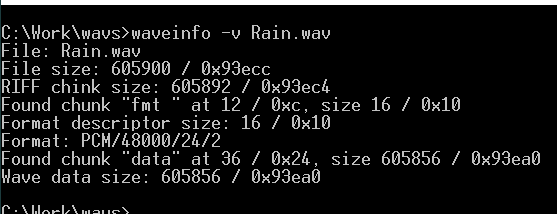


Waveinfo is a lightweight Windows utility for inspecting WAV audio files. It is intended for audio professionals, sound engineers and anyone who needs to check a file's technical properties before using it in a recording, editing or delivery workflow. Rather than modifying audio, it reports information that helps users understand what a file contains and whether its specifications suit a particular task.
For each WAV file, Waveinfo displays details such as file size, duration, sample rate, bit depth and channel count. These values help identify differences between recordings, verify export settings and check compatibility with audio applications or project requirements. The program also examines WAVE file structure, including RIFF information and the data represented by its format descriptors and chunks, giving users a closer look than a basic file browser provides.
Waveinfo can analyze multiple files in a batch, which is useful when reviewing a folder of recordings or comparing exports from the same session. Results are presented in an organized interface, so users can find relevant values without opening files in a full audio editor. Display customization lets users choose how information is presented or which details are shown, adapting the view to routine checks or more focused inspection. Its small footprint suits quick checks on systems where a larger production application is unnecessary.
Typical uses include confirming sample rate and bit depth before importing audio into a project, checking channel counts across a collection, comparing file duration and size, and reviewing WAV files received from another person or system. Batch inspection can help spot files with inconsistent specifications before they are passed to an editor, mixer or archive. Waveinfo is an information utility, not a recording or editing application, so it does not replace tools used to capture, process or convert sound.
Waveinfo is freeware from Eugene Muzychenko. It supports Windows 10 and Windows 11, as well as several earlier Windows releases. Its focused purpose and compact size make it suitable for keeping alongside audio software as a dedicated file-inspection tool. Users who need to review WAV properties or examine their internal structure can use it without bringing a full digital audio workstation into the workflow.