Qupil
... to the download page for Qupil, an exceptional Windows 10 software developed by the talented Felix Hammer. Qupil is ... you to effortlessly manage your notes, tasks, and projects, ensuring you stay on top of your game. ...

Whatcha Doing? is a background task and time tracker that periodically prompts users to record what they are working on, with task entry designed to take as little as one click. It tracks time by task and produces printable reports with task totals. Basecamp integration supports task and time reporting, while an optional paid feature adds online tracking and reporting for teams and organizations.
| Author: | FishBytes LLC |
| License: | Freeware |
| Price: | FREE |
| Released: | Apr 8, 2013 |
| File size: | 2.90 MB |
| Downloads: | 271 |
| Keywords: | x64 application, printable time reports, work activity tracker, Task Tracker, Whatcha Doing?, Timer, Task Timer, Windows 10 software, Tracker, productivity tool, automatic task timer, Project Traker, task management, FishBytes LLC, task time tracker, Project, basecamp time tracking, project time tracking |
| Author URL: | http://fish-bytes.com/ |
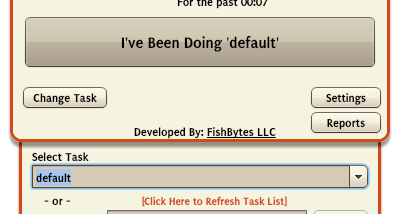

Whatcha Doing? is a background task and time tracker for people who want to keep records of how their workday is spent without manually starting and stopping a timer for every activity. It periodically prompts users to note what they are working on, with task entry designed to take as little as one click. This makes it suited to individual work as well as projects where accurate time totals are useful for review or reporting.
The application records activity against tasks and handles transitions when work changes, reducing the need to remember to stop one clock and start another. Periodic prompts provide a reminder to identify the current task, helping capture time that might otherwise be missed while concentrating on work. The approach is intended to keep tracking lightweight rather than requiring continuous attention to a timer.
Printable reports summarize recorded time by task. These totals can help users review how much time different activities take and prepare a record of project work. An optional paid feature adds online reporting and tracking for teams, groups, and organizations. The program also integrates with Basecamp for task and time reporting, providing a way to connect its tracking workflow with that project-management service.
Whatcha Doing? can be used to monitor personal work habits, account for time spent on project tasks, or gather task-based totals for a team. Its periodic prompts suit people who prefer to be reminded to record activity instead of managing a stopwatch throughout the day. Local printable reports support straightforward review, while the optional online feature is intended for collaborative tracking.
The core application is freeware; online reporting and tracking is an optional paid feature. The supplied operating-system information covers Windows XP through Windows 8, so compatibility with Windows 10 and Windows 11 should be confirmed before installation. The installer is approximately 3 MB.