Wing IDE Professional
Wing IDE Professional is a Python development environment for programmers working on applications of any size, ... editor, project and source browsing tools, and a debugger, using knowledge of the code to surface relevant ...

Wing IDE Personal is a freeware Python development environment for hobbyists and educational users. Its editor provides context-aware completion, call signatures, documentation, error indicators, automatic indentation and navigation to definitions. A source browser organizes code by modules and classes, while search tools help locate text across files. The debugger supports programs launched in different ways and offers exception inspection, conditional breakpoints, watched values and an interactive Python probe.
| Author: | Wingware |
| License: | Freeware |
| Price: | FREE |
| Released: | May 3, 2024 |
| File size: | 87.10 MB |
| Downloads: | 418 |
| Keywords: | x64 software analysis, python code editor, python ide, Wing IDE Personal review, Wingware development, python source browser, python development environment, python autocomplete, syntax highlight, Python programming tool, python debugger, debug, ide, debugger, Advanced debugging features, Windows 10 compatibility |
| Author URL: | https://wingware.com/ |
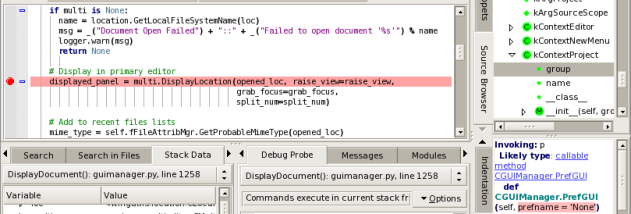

Wing IDE Personal is a Python development environment for hobbyists and learners who need an editor, code navigation and debugging tools in one application. It analyzes Python source to provide context-sensitive assistance while code is being written and while a project is explored. The Personal edition is a freeware option for users who do not need the complete feature set of Wing IDE Professional.
In the editor, automatic completion offers suggestions based on the code's current context and updates as source changes. The source assistant displays relevant call signatures and documentation, while error indicators flag problems as code is entered. Go to definition jumps to where a symbol is defined, and navigation menus provide an index of code within each editor. Automatic indentation follows the surrounding context; an indentation analyzer can inspect, repair and convert indentation styles in source files. The source browser organizes files and projects by modules and class hierarchy, making it easier to follow unfamiliar code.
Wing's debugger can work with Python programs launched from the IDE, started externally such as by a web server, or running as scripts in an embedded Python interpreter. It distinguishes handled from unhandled exceptions and lets a developer inspect runtime state when an exception occurs. Conditional and ignore-counted breakpoints help focus on specific cases in frequently executed code. During a pause, the Debug Probe runs Python commands in the program's context; watched values and expressions can be tracked as execution changes, and displayed data can be modified to test alternative states. A module view presents loaded modules from sys.modules.
For searching, Wing offers a toolbar quick search, a keyboard-driven interactive mini-search and the Search Manager. The source browser and navigation tools complement these searches by helping locate code structurally rather than only by text. The interface can be restyled while working, with 28 themes that include dark, low-contrast, high-contrast and large-print choices. These options support different visual preferences and make the editor adaptable across study sessions or project work.
Wing IDE Personal is intended for individual Python learning and hobby projects where code editing, source exploration and interactive debugging are useful together. It is freeware and supports Windows 10 and Windows 11, including 64-bit editions. The Personal edition has a smaller feature set than Wing IDE Professional, so users who require Professional-only capabilities should compare the editions before choosing. Its combination of code assistance, navigation, search and debugging is suited to learning how a program is structured as well as investigating errors during execution.