wxLame for Windows 10 - Full description
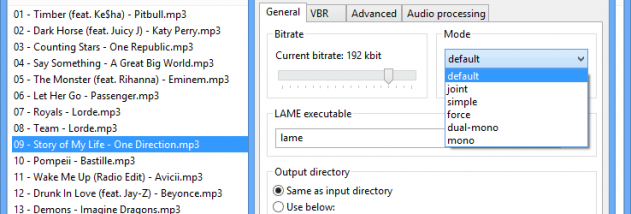
wxLame is a graphical front end for the LAME MP3 encoder. It is intended for people who want to convert audio to MP3 through a desktop interface rather than work directly with encoder commands. The program brings LAME's encoding controls into a compact application, making it easier to set up and run an MP3 conversion task.
The central workflow is selecting audio for conversion and configuring the available encoding options before starting the process. These controls provide a way to adjust how LAME creates the MP3 output, while the graphical interface avoids the need to enter command-line parameters manually. wxLame is therefore useful both for straightforward conversions and for users who want to explore how encoding choices affect an output file.
LAME is an open-source MP3 encoder project focused on areas such as psychoacoustics, noise shaping and encoding speed. wxLame provides access to that encoder in a separate GUI, keeping the conversion workflow approachable while retaining LAME as the component that performs the encoding. Its small footprint makes it a practical option for a basic, dedicated MP3 conversion setup.
Typical uses include making MP3 copies of audio for portable playback, converting files for software or devices that require MP3, and experimenting with encoder settings for learning purposes. It is not presented as a general-purpose audio editor or a full media library manager; its role is to provide a graphical way to use LAME for MP3 encoding.
wxLame is open-source software and is available at no cost. Windows 10 is among the supported operating systems. The program depends on the LAME encoder for its central function, so it is best suited to users looking for a focused LAME interface rather than a broad audio production suite.