Xerox Mobile Express Driver for Windows 10 - Full description
Xerox Mobile Express Driver is a universal printer driver for people who print from different offices, campuses, or other locations. Rather than installing a separate driver for every printer, users can install one driver and use it to print to compatible PostScript printers and multifunction devices on a network, including models from manufacturers other than Xerox. It is intended to simplify printing when the available devices change from one network or site to another.
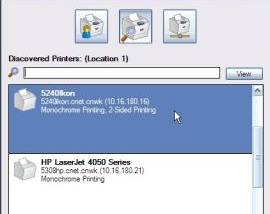
The driver can detect a user's location from the local network and refresh the list of preferred printers for that location. When a print job is sent, it shows which discovered devices are online and available. The list can be sorted by status, location, or printer name, making it easier to find a suitable device in a busy office. A location's most recently used printer is moved to the top of the list, reducing repeated searching for people who regularly print in the same places.
Selecting a printer opens its available feature options, so users can compare capabilities before sending a job. The driver configures itself to expose the features available on most Xerox printers, while presenting a consistent interface across supported devices. Users can also save print preferences for individual applications. For example, an email application can retain preferences for black-and-white, double-sided printing; those saved settings can then be applied when printing to a different printer or from another location.
Printer discovery updates the list as device availability and features change. Administrators or users can specify alternate subnets to search for a location, which is useful when wireless computers and printers are on separate network segments. These tools are aimed at mobile employees, people who work across multiple offices, and organizations with mixed printer fleets. The driver reduces the need to identify printer addresses or locate and install individual device drivers each time a user changes networks.
Xerox Mobile Express Driver is freeware and is installed directly on a Windows PC. It supports Xerox and non-Xerox PostScript network printers and multifunction devices; it is not a universal driver for every printer type. The documented Windows support includes Windows XP, Vista, 7, 8, and 10, with 64-bit editions listed for Vista, 7, 8, and 10. Printer discovery depends on access to the relevant network and, where needed, the correct subnet settings.