Advanced Command Line PDF Splitter
Advanced Command Line PDF Splitter is a Windows utility for dividing PDF documents ... workflows. Rather than requiring each document to be split by hand, it offers several ways to identify ...

A-PDF Scan and Split separates batch scans or existing scanned PDFs into individual files. It detects blank pages or printed barcode pages as document boundaries, then splits the PDF at those points. Separator pages can be discarded or kept at the start or end of each output file. Barcode support includes EAN, UPC, Code 128, Code 39, Code 93, Codabar, Interleaved 2 of 5, and Patch codes. It is designed for workflows that use an automatic document feeder to scan mixed paperwork.
| Author: | A-PDF.com |
| License: | Demo |
| Price: | $44.10 |
| Released: | Jan 10, 2014 |
| File size: | 4.40 MB |
| Downloads: | 330 |
| Keywords: | split scanned pdf, scan and split documents, splitter, blank page pdf split, Document management, High-quality output, barcode pdf splitter, split multipage pdf, split, User-friendly interface, PDF scan, PDF splitting, scanner, split PDF, pdf batch scanner, PDF splitter, Efficient file organization, Batch scanning |
| Author URL: | http://www.a-pdf.com/ |
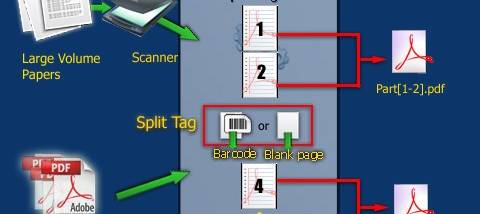

A-PDF Scan and Split is a Windows utility for turning batches of unrelated paper documents into separate PDF files. It is intended for offices and other workflows that use an automatic document feeder to scan invoices, forms, or mixed paperwork in one run. Rather than requiring each document to be scanned separately, the program uses separator pages to identify where one document ends and the next begins.
For a new scan, the operator places a blank sheet or a page printed with a barcode between documents, loads the batch into the scanner, and starts the job. The software detects those separator pages and splits the resulting scan into individual PDFs. This makes it practical to process a stack of papers with different page counts without manually separating the output afterward. Blank-page and barcode-page detection provide two ways to mark document boundaries, depending on the materials and scanning process.
The same splitting workflow can be applied to PDF files that have already been scanned, so paper does not have to be rescanned just to divide a large file. Separator pages can be removed from the resulting documents or retained at the beginning or end of each part. This setting lets a workflow use the marker purely as a divider, or keep it with the document when the page carries useful identification or processing information.
Barcode recognition covers common retail and industrial formats, including EAN-13, EAN-8, UPC-A, UPC-E, Code 128, UCC/EAN-128, Code 39, Code 93, Interleaved 2 of 5, Codabar, and Patch codes. Barcode dividers are useful when documents need a printed identifier as well as a split point, while blank sheets offer a simple option when no barcode system is required. The central task remains batch scanning and document separation rather than editing or changing the contents of each PDF.
A-PDF Scan and Split is offered as demo software. The provided operating-system information lists Windows XP, Vista, 7, and 8; Windows 10 and 11 compatibility is not established by that information. It is most relevant to users with an ADF scanner who regularly process mixed paper batches, as well as users who need to divide existing scanned PDFs using blank-page or barcode separators.