Shotcut
... to the download page for Shotcut, a top-tier video editing software developed by Shotcutapp. This innovative software is designed for Windows 10, providing users with ...

AVI ReComp recompresses AVI videos using Xvid, with controls for output size, resolution, aspect ratio and FourCC. It can adjust encoding options such as QPEL, GMC, B-frames and bitrate spikes for playback compatibility. The program also burns in subtitles, adds bitmap logos, converts supported audio streams and queues batch jobs. Preview tools help check video settings before encoding.
| Author: | Mateusz Gola |
| License: | Open Source |
| Price: | FREE |
| Released: | Mar 12, 2014 |
| File size: | 29.50 MB |
| Downloads: | 585 |
| Keywords: | avi recompression, avi batch encoding, xvid avi encoder, avi subtitle burner, avi video resizing, divx recompress, Mateusz Gola, AVI ReComp, avi convert, Windows 10 compatible, avi video converter, x64 architecture, video compression, xvid recompress, video editing software, transcode, convert, encoder |
| Author URL: | http://www.avirecomp.com |
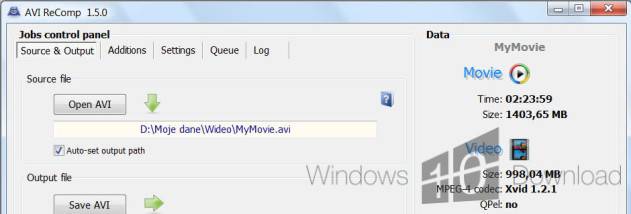

AVI ReComp is a Windows utility for recompressing and preparing AVI video files. It is suited to people who need to reduce or change an AVI's size, adjust its video properties, add subtitles or logos, or alter encoding settings for playback on standalone DVD players. Recompression uses the Xvid codec, and the program can process AVI files with or without audio.
The video settings include output size, FourCC code, resolution and aspect ratio. Compatibility controls can disable QPEL and GMC, limit consecutive B-frames or disable B-frames, and control bitrate spikes. These options help prepare clips for devices that have trouble with particular encoding features. Cropping can remove existing black borders, while resizing changes the video dimensions; preview tools let users inspect the result of the settings before encoding.
Subtitles can be permanently burned into the picture from formats including SRT, SSA, ASS, MicroDVD, SubViewer2, TMPlayer and VobSub. For SSA and ASS files, users can change properties such as font, size, color, position, outline, shadow and text style, and save custom subtitle presets. AVI ReComp can also add a bitmap logo as a watermark, with controls for its placement, visibility, timing and fade effects. Batch encoding helps queue multiple AVI jobs, and file information tools provide details about source clips.
Audio streams can be converted using VBR, ABR or CBR encoding modes and a selected bitrate. Supported AVI audio formats include MP3, WAV, AC3, DTS and Ogg, and silent AVI files are also accepted. Together, these controls make the program useful for standardizing a collection of clips, embedding subtitles for devices that cannot display them separately, or modifying older AVI files before playback or sharing.
AVI ReComp is open-source software. Its installer includes components used in the recompression workflow, including VirtualDubMod, AviSynth and Xvid. The interface is available in multiple languages. The supplied platform information lists Windows versions through Windows 10; it does not establish support for Windows 11.