Balsamiq Mockups for Windows 10 - Full description
Balsamiq Mockups is a low-fidelity wireframing tool for product managers, designers, developers and clients who need to plan software interfaces before implementation. Its sketch-like visual style keeps attention on page structure, content and functionality rather than polished graphics. That makes it useful in early design discussions, when ideas are still changing and a quick rearrangement is more valuable than detailed visual styling.
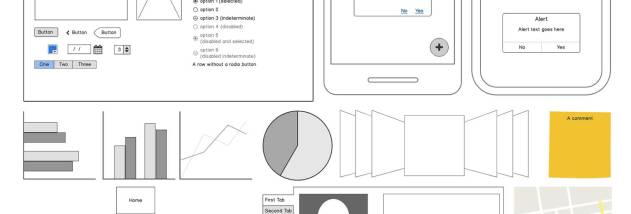
The editor provides interface components and icons that can be dragged into a mockup and arranged to represent screens, controls and navigation. It includes 75 built-in user interface components and 187 icons, with additional community-created components available. The hand-drawn appearance helps teams communicate the intended role and placement of elements without suggesting that a wireframe is a finished design. Mockups can be adjusted as feedback changes, avoiding the need to redraw a concept from scratch.
Screens can be linked to create click-through prototypes. These links let reviewers move between mockup pages in a way that resembles basic application navigation, supporting demonstrations and usability testing. Teams can use the prototype to discuss whether a workflow is understandable and identify missing or misplaced steps before writing code. The tool also supports collaborative iteration in real time, including working through designs together during a meeting.
Mockups can be exported to PNG for image-based sharing or to PDF for presenting and distributing designs. PDF exports can retain embedded links, so a prototype can remain navigable when shared outside the editor. This supports a workflow that moves from sketching and review to discussion, testing and handoff, while keeping the focus on interface ideas rather than implementation.
Balsamiq Mockups is trialware for Windows, including Windows 10 and Windows 11. It is suited to teams and individuals who need to communicate interface concepts early, gather feedback, compare alternatives or explain an application flow to stakeholders. Its low-fidelity approach is intended for planning and discussion, not for producing finished visual assets or implementing software.