Audio Splitter
... download page for ZISUN Software's innovative product, "Audio Splitter". This Windows 10 compatible software is a must-have tool for all your audio editing needs. Audio Splitter is a freeware that allows you to split ...

Blu-ray to MKV converts Blu-ray video and ISO images into MKV files. It lets users choose audio and subtitle tracks, create standard-definition or 720p and 1080p output, and resize HD video with its image filter. A quality analyzer helps tune settings, while live preview shows conversion progress. The integrated burning engine can also write the project to DVD.
| Author: | VSO-Software |
| License: | Shareware |
| Price: | $39.99 |
| Released: | Nov 21, 2019 |
| File size: | 54.10 MB |
| Downloads: | 231 |
| Keywords: | convert blu-ray to mkv, Blu-ray Converter, Blu-ray to MKV, blu-ray ripping software, Windows 10 compatible, Rip Blu-ray, high-definition quality, mkv video converter, blu-ray to mkv converter, Splitter, blu-ray iso converter, VSO-Software, blu-ray video extractor, Extractor, video conversion, Blu-ray Ripper, Ripper, x64 architecture |
| Author URL: | https://www.vso-software.fr/ |
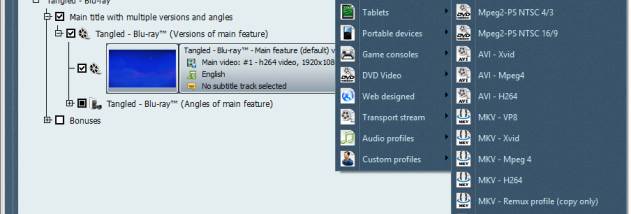



Blu-ray to MKV is a Windows video conversion utility for users who want to extract a Blu-ray movie into an MKV file. It accepts Blu-ray video and ISO images as input, and lets users select the audio and subtitle tracks for the output. The program is designed for a guided workflow, with the main choices made before conversion begins.
Output can be encoded at standard definition or in high definition, including 720p and 1080p sizes. When a smaller file or playback size is needed, the image filter resizes the video from HD to SD; users can also retain the source's high-definition dimensions by choosing an output that does not require resizing. A quality analyzer helps adjust conversion settings, so users can review the picture-quality options before starting the encode.
A live preview shows the conversion as it progresses, providing a way to monitor the job rather than waiting until it is complete to inspect the result. After conversion, the integrated VSO burning engine can burn the MKV project to DVD. This adds a disc-writing step to the workflow without requiring a separate burning application, though the output is an MKV-based project rather than a Blu-ray disc authoring process.
The software can be useful for creating MKV copies of Blu-ray video for playback on devices that do not support Blu-ray discs, or for choosing a lower-resolution output for more modest display and storage needs. Selecting preferred audio and subtitle tracks is particularly practical when a source contains several language options. Support for ISO input also allows users to work from a disc image rather than only from a physical Blu-ray source.
Blu-ray to MKV is shareware and is available for Windows, including Windows 10. The conversion controls focus on source selection, track choice, output size and quality, followed by encoding and optional DVD burning. The program is aimed at users who want a straightforward disc-to-MKV workflow with resizing and track selection, rather than a general-purpose video editor.