cineSync Play
CineSync Play, developed by Backlight, is a revolutionary tool ... regardless of their location. With its intuitive interface, CineSync Play simplifies the feedback loop, allowing users to ...

cineSync is a remote review and approval tool for teams working with films and visual media. It synchronizes QuickTime movie playback across locations, letting participants review the same frames together. Reviewers can build playlists, mark frames, draw, circle or point to details, and add text notes. Sessions and annotations can be saved, while Final Cut Pro XML support carries notes between review and editing workflows. A built-in FTP client helps manage media transfers.
| Author: | Cospective |
| License: | Demo |
| Price: | $99.00 |
| Released: | May 25, 2023 |
| File size: | 60.00 MB |
| Downloads: | 315 |
| Keywords: | QuickTime, cineSync review, remote movie review, video collaboration tool, synchronized video playback, Windows 10 compatibility, Synchronise, remote team communication, x64 architecture, Cospective software, Synchronise QuickTime, media, visual media, quicktime review tool, video review software, frame annotation tool, FTP client, film collaboration software |
| Author URL: | https://cospective.com/ |
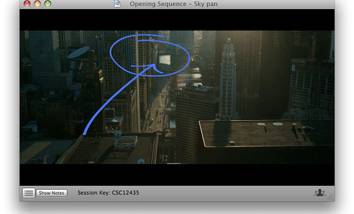

cineSync is a remote review and approval application for teams working with films and other visual media. It synchronizes movie playback across participants in different locations, so editors, artists, clients, and production teams can examine the same frame and discuss changes in real time. The shared timeline keeps everyone aligned during playback and frame-by-frame review, making it useful when collaborators cannot sit together at an edit suite.
A review can contain a playlist of movies, allowing a group to move between shots without ending the session. Participants can play or scrub through synchronized QuickTime movies, add markers to specific frames, and use those markers to return to important moments. Drawing tools support practical feedback directly on the image: reviewers can sketch, circle details, point with arrows, or add text notes. Drawing colours help distinguish participants' annotations, and saved drawings can be exported as PNG or JPG files for later reference. A built-in whiteboard and blackboard provide space for discussion that is not tied to a particular movie frame.
The Playlist Organiser handles media and review materials. It can add, remove, and reorder movies, locate local copies automatically, and transfer files through its built-in FTP client, including one-click downloads. cineSync can also import editors' notes from Final Cut Pro XML and export session notes in that format, helping teams carry feedback between a review and an editing workflow. Session data and drawings can be saved so that decisions and annotations remain available after a live review has ended.
cineSync is suited to distributed post-production, animation, visual effects, and other workflows where precise visual feedback matters. Clients can join a review without creating their own account, using a session-specific key and a small self-contained package. Because movies are not transferred through cineSync's servers, teams can keep media on their own file servers while synchronizing review activity. The software is based on Apple QuickTime technology and supports drawing with a mouse or a Wacom tablet, including compatible pen-display workflows.
The application is offered as demo software and is intended for Windows 10 and Windows 11 systems. Its synchronized sessions, annotations, markers, and saved notes are designed to make remote approval more structured than exchanging general comments by email, while leaving media storage under the team's control.