ClickYes Pro for Windows 10 - Full description
ClickYes Pro is a Windows utility for automating Microsoft Outlook security prompts. It is intended for people who use scripts, Outlook add-ins or other applications that request access to Outlook data and encounter repeated confirmation dialogs. Rather than requiring someone to respond to each prompt manually, the utility can handle configured prompts in the background, helping automated tasks continue without interruption.
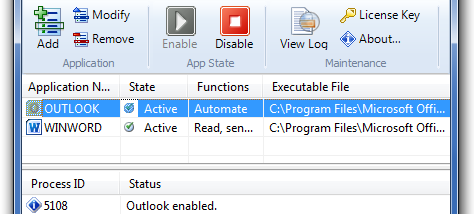
The program can run as a background service, so its prompt-handling work does not require a visible window or repeated user interaction. Users can configure which applications are permitted to trigger automatic responses. Restricting this behavior to trusted programs helps avoid granting access indiscriminately, since approving an Outlook security prompt can allow an application to interact with mail data. This makes configuration an important part of using the tool safely.
ClickYes Pro also records its actions in a log. The record can help administrators or users check whether a prompt was handled and investigate unexpected behavior. Its settings and interface are designed for straightforward configuration, while the background operation suits machines where Outlook automation needs to run routinely. The utility addresses prompt handling rather than providing email, calendar or contact-management features of its own.
Typical uses include running a trusted application that reads or sends Outlook information, supporting an Outlook add-in workflow, or keeping an automated script from pausing at a confirmation dialog. It can be useful in administrative and development setups where such prompts interrupt repeatable processes. Before enabling automatic responses, users should verify the applications that will be allowed and review the log as needed; broad approval can weaken the protection provided by Outlook's prompts.
ClickYes Pro is distributed as demo software by ContextMagic.com. It is intended for Windows, with support listed for Windows 10 and Windows 11 as well as several earlier Windows desktop and server editions. It requires Microsoft Outlook to be useful, and its suitability depends on the Outlook environment and the application's security prompts. The utility does not replace Outlook's security controls; it automates selected responses to them.