Portable Wise Disk Cleaner
... can review the results and choose what to remove, which makes it possible to focus on particular categories instead of applying every cleanup option. Scans can also be customized by selecting ...

Crapfixer is an open-source Windows utility for removing unwanted pre-installed applications and redundant files. It scans the system and presents detected items for review, allowing users to choose what to keep or remove. Additional controls help manage startup programs and adjust selected Windows settings, including options related to telemetry. It is suited to users who want a straightforward way to reduce system clutter and control routine cleanup decisions.
| Author: | Builtbybel |
| License: | Open Source |
| Price: | FREE |
| Released: | Dec 25, 2025 |
| File size: | 164 kB |
| Downloads: | 186 |
| Keywords: | download Crapfixer, builtbybel software, crapfixer, Builtbybel, windows bloatware remover, windows cleanup utility, system optimization, remove preinstalled apps, system cleanup, user-friendly interface, manage startup programs, Windows maintenance, remove, GitHub, software, optimization, disable windows telemetry, cleanup, debugging, junk file cleaner, disable setting, remove telemetry, telemetry, Crapfixer, Crapfixer free download, performance booster, disable |
| Author URL: | https://github.com/builtbybel/xd-AntiSpy |


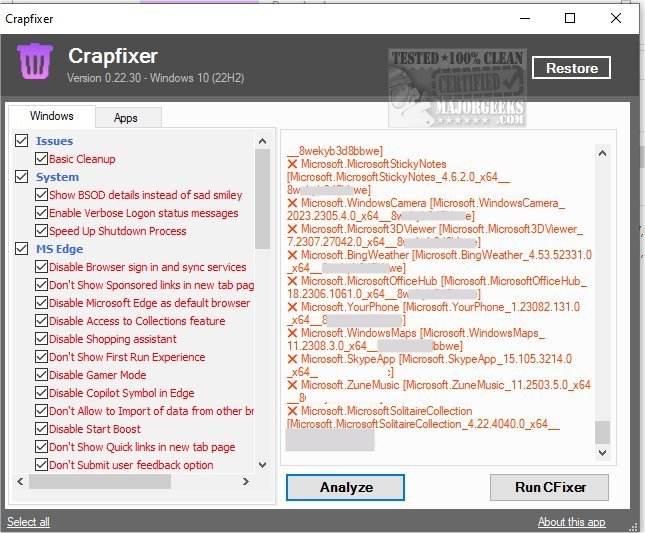

Crapfixer is an open-source Windows utility from Builtbybel for users who want to remove pre-installed applications and adjust selected system settings. It focuses on reducing unwanted software and clutter, with options related to telemetry and Windows configuration. Its straightforward interface is intended to make cleanup tasks approachable for both less experienced users and those who want more control over their system.
The utility scans Windows for bloatware and redundant files, then presents detected items for review. Users can decide what to retain and what to remove rather than having every result deleted automatically. This review step is useful when a computer includes manufacturer-installed apps that are unnecessary for one person but still useful to another. After choosing items, users can run cleanup actions to remove the selected software or files.
Crapfixer also provides controls for managing startup programs and adjusting system settings. Startup management helps users review applications configured to run when Windows starts, while settings options let them change selected configuration choices, including those associated with telemetry. These tools bring several routine maintenance tasks into one utility, so users can review installed software, startup behavior and selected Windows options without treating them as a single, irreversible cleanup operation.
The program can be used to tidy a new PC with unwanted bundled apps, reduce clutter on an existing Windows installation, or review startup items and settings as part of occasional maintenance. Its item-by-item review makes it suitable for users who prefer to choose what changes, though removing applications or changing system settings can affect how Windows or other software behaves. Reviewing each proposed change before applying it is prudent, particularly when an item or setting is unfamiliar.
Crapfixer is free and open source, and supports Windows 10 and Windows 11, including 32-bit and 64-bit Windows 10 systems. It is a focused cleanup and configuration tool rather than a general-purpose PC optimizer: its primary tasks are identifying unwanted software and files, managing startup applications, and changing selected system settings.