Moo0 MultiDesktop
... users keep separate sets of windows on different desktops and switch between them as needed. The main use ... each have their own group of windows. Switching desktops changes which group is in view, making it ...

Desktops is a Microsoft Sysinternals utility for organizing open applications across as many as four virtual desktops. Users can switch with configured hotkeys or select a workspace from the tray icon's desktop preview. It uses Windows desktop objects to associate windows with the workspace where they were created, keeping the utility lightweight. It cannot move windows between desktops or close individual desktops.
| Author: | Microsoft |
| License: | Freeware |
| Price: | FREE |
| Released: | Oct 12, 2021 |
| File size: | 205 kB |
| Downloads: | 393 |
| Keywords: | Window Organizer, Desktop Manager, Microsoft Desktops, x64 software, multi-desktop functionality, Switcher, desktop switcher, virtual workspace tool, user-friendly interface, Virtual Desktop, system utilities, Organizer, virtual desktop manager, multiple desktop utility, sysinternals desktops, Windows 10 compatibility, window organizer, Window Manager |
| Author URL: | https://www.microsoft.com |
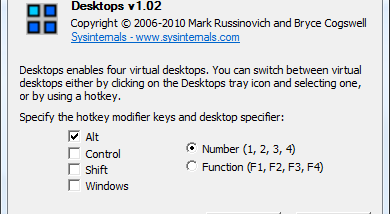



Desktops is a lightweight virtual desktop utility from Microsoft Sysinternals for people who want to separate open applications into distinct workspaces. It supports up to four desktops, letting users keep unrelated windows out of view while they focus on a particular set of tasks. For example, email can stay on one desktop, a browser on another, and productivity applications on a third.
Users can set hotkeys for switching between desktops, then use those shortcuts to move from one workspace to another. A tray icon provides another way to navigate: clicking it opens a desktop preview and switching window, where users can view and select a desktop. The arrangement is useful for reducing visible window clutter without closing applications or repeatedly minimizing and restoring them.
Rather than keeping one desktop and hiding windows assigned to other workspaces, Desktops uses a separate Windows desktop object for each one. Windows associates application windows with the desktop object where they were created, and handles which windows appear when the user switches desktops. This design keeps the utility lightweight and avoids inconsistencies that can occur when a utility maintains its own view of which windows should be visible. The approach also shapes the program's limitations: it cannot move an existing window from one desktop to another.
Each desktop needs a separate Explorer process to provide a taskbar and Start menu. As a result, most tray applications are visible only on the first desktop. Desktops also cannot delete a desktop object, so it does not offer a way to close individual desktops; closing one could leave its windows and processes without a desktop. The recommended way to exit the utility is to log off, making it best suited to users who can keep their desktop setup for the duration of a Windows session.
Desktops is freeware and is intended for organizing work across multiple virtual desktops rather than providing a full window-management system. Its documented operating-system support includes Windows 7, Windows 8 and Windows 10, including their 64-bit editions. Users looking for window transfer between desktops, independent tray icons on every workspace or the ability to remove desktops should consider these restrictions before relying on it.