Total PDF Printer
Total PDF Printer by CoolUtils Development is a powerful and user-friendly software solution designed to streamline your PDF printing tasks. With its intuitive interface, this tool allows ...

DOSPRN helps older DOS applications print text through a connected Windows printer, including when they were designed for text-mode printers. It provides controls for printer selection, page orientation, spool handling, margins and font appearance. Long lines can be wrapped to fit the page, and printing can start automatically after files are selected. The compact utility can stay in the system tray for quick access.
| Author: | DOSPRN |
| License: | Shareware |
| Price: | $14.95 |
| Released: | Oct 21, 2026 |
| File size: | 2.50 MB |
| Downloads: | 721 |
| Keywords: | print server, fax printer, user-friendly interface, dos print compatibility, prn2file, DOS print, pdf printer, printing, dos printer emulator, dos program, reliable performance, x64 compatibility, Windows 10 application, DOS USB, dos text printer support, DOSPRN, print from dos programs, usb printer, printfil, DOSPRN software, dos printing utility, legacy dos printing, dosprint, DOS printing solution, print |
| Author URL: | https://dosprn.com/ |

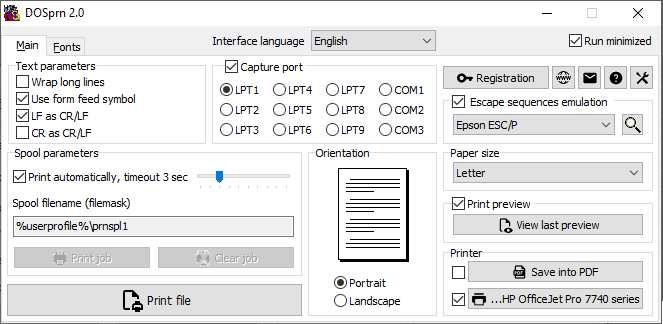



DOSPRN is a Windows utility for printing text from older DOS applications that expect a text-mode printer. It acts as a compatibility layer between those programs and a connected printer, letting users keep working with DOS software even when its original printer interface is unavailable. It is intended for businesses and individuals who still depend on legacy applications for routine documents, reports or records.
The program receives print output from a DOS application and prepares it for printing through a selected printer. Its settings let users choose page orientation and adjust spool parameters, which control how print jobs are handled. An option to start printing automatically when files are selected can simplify repeated jobs, while controls for managing a job are available after processing begins. Long lines can be wrapped to fit the page instead of extending past the printable area.
DOSPRN also provides controls for the appearance of printed text. Users can set the font, style, size and page margins to make output more legible or suit the layout of a document. A sample line gives a basic indication of how selected characters will look, and the application keeps page and text options in separate tabs. The main window is compact, and DOSPRN can remain in the system tray so its controls are available without taking up desktop space.
The tray menu provides quick access to actions such as opening a file or starting a print job. These shortcuts are useful for occasional printing, while the main window is better suited to changing printer, page or font settings. The available preview is limited, so users may need to print a test page to check the final layout, especially after changing text dimensions or margins. The workflow is focused on turning DOS text output into pages rather than providing a full document editor or print-scheduling system.
DOSPRN is shareware for Windows 10 and Windows 11, with support for both 32-bit and 64-bit Windows 10 systems. It is most relevant where older DOS programs remain part of an established workflow and their text output needs to reach a current printer. The program's settings help adapt that output to different page and text requirements, though the result can depend on the source program's print data and the chosen printer.