DTM Data Generator Professional
Welcome to the world of DTM Data Generator Professional, a cutting-edge software solution developed by the renowned DTM soft. This Windows 10 compatible software is a must-have ...

DTM Data Generator Enterprise creates test data for database tables, helping developers and testers populate databases for application checks and test runs. Data can be generated randomly, follow a mask, or come from another table. Each table can have separate rules, value ranges and parameters, and a data pack can combine multiple tables. The program also supports reusable user-defined templates and can generate SQL statements for database operations.
| Author: | DTM soft |
| License: | Demo |
| Price: | $439.00 |
| Released: | Jul 27, 2021 |
| File size: | 5.00 MB |
| Downloads: | 425 |
| Keywords: | SQL database testing, generator, DTM soft, generate, data generator, data simulation software, Windows 10 compatible software, DTM Data Generator Enterprise, database tester, database test data generator, data generation tool, database, sql test data generator, database table data generator, generate database test data, database table, database testing utility, random database data |
| Author URL: | https://sqledit.com/ |


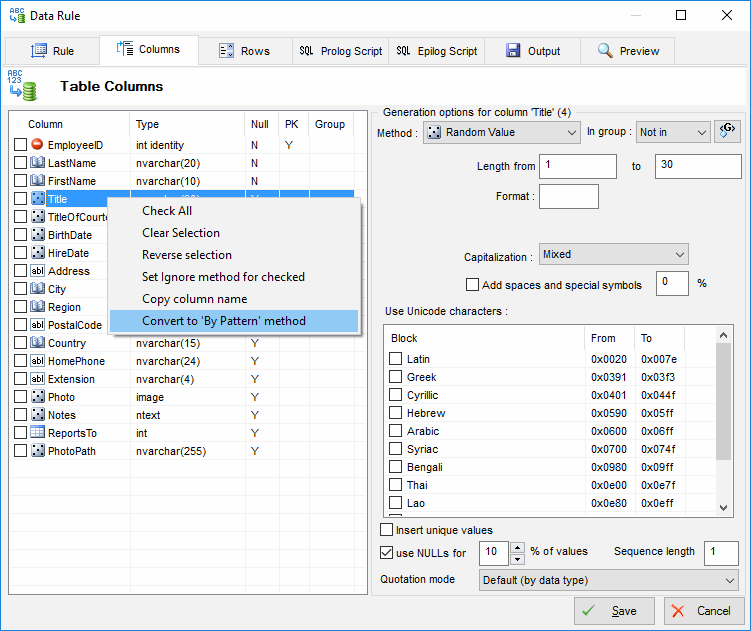


DTM Data Generator Enterprise creates test data for database tables, giving database developers and testers a way to populate databases without preparing every value by hand. It can produce datasets for testing application behavior, validating database structures and exercising queries or workflows with varied records. Its table-focused setup makes it possible to define generation rules separately for different parts of a database.
Data can be generated randomly, produced according to a mask, or drawn from another table. Random generation helps create varied test records, while masks let a user constrain values to a chosen pattern. Using data from an existing table is useful when generated records need to reflect values already present in a database. These options can be applied as appropriate to each table rather than relying on one rule for an entire dataset.
A data pack can include multiple tables, each with its own rules, value ranges and parameters. This gives teams a way to prepare related test data in a single set while tailoring the values to each table's needs. The software also supports user-defined templates, allowing generation settings to be reused for recurring database tests. Generated data can be inserted into a database, and the program can create SQL statements for database operations.
These features suit developers building or maintaining database-backed applications, as well as testers who need repeatable ways to populate test environments. A team can use separate table settings to cover different field requirements, generate records for a fresh test run, or use existing table data as a source when that better fits the scenario. Templates and saved parameters can help keep repeated test preparation consistent, while multiple-table packs help organize a broader dataset.
DTM Data Generator Enterprise is distributed as a demo. Its documented Windows compatibility includes Windows 10, along with earlier Windows releases; Windows 11 compatibility is not established here. The tool is intended for database testing and data preparation rather than general-purpose spreadsheet editing. Database connection and insertion details depend on the database environment and the configured operation.