X-DVDStyler
Welcome to the ultimate destination for Windows 10 users seeking a remarkable software experience. Discover the exceptional X-DVDStyler, crafted by the brilliant minds at winPenPack. This ...

DVDStyler is a free, open-source DVD authoring application for creating video discs with interactive menus. It accepts AVI, MPEG and other media formats, supports commonly used video and audio codecs, and can use suitable MPEG or VOB files without re-encoding. Its menu editor lets users add backgrounds, position and style buttons, text and images, and link screens to video titles. Drag-and-drop tools help organize a project before burning it to DVD.
| Author: | Alex Thuering |
| License: | Open Source |
| Price: | FREE |
| Released: | Nov 25, 2017 |
| File size: | 40.00 MB |
| Downloads: | 266 |
| Keywords: | DVD, Styler, dvdstyler download, dvd video creator, create dvd menus, DVD authoring, DVD Authoring, DVDStyler, create DVD, burn video to dvd, open-source software, dvd authoring software, Alex Thuering, create menu, video editing, Authoring, interactive menus, dvd menu designer, DVD Styler |
| Author URL: | http://www.dvdstyler.org/ |
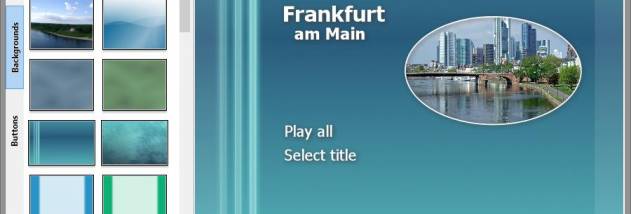

DVDStyler is an open-source DVD authoring application for people who want to turn video files into DVD-Video discs with custom interactive menus. It combines disc preparation and menu design in one interface, so users can arrange video titles, build a navigation screen and burn the finished project to DVD. Its menu tools suit projects ranging from a simple play screen to a more tailored layout with artwork and multiple choices.
The application accepts AVI, MPEG and other video formats, along with commonly used codecs such as MPEG-2, MPEG-4, DivX and Xvid. Audio support includes MP2, MP3 and AC-3. MPEG and VOB files can be added without re-encoding when their properties are suitable, which can avoid an unnecessary conversion step. Different audio and video formats can also be combined on a disc using titlesets, allowing a project to group several sources rather than requiring every file to begin in the same format.
DVDStyler's menu editor uses scalable vector graphics and lets users import an image for a background. Buttons, text, images and other graphic objects can be placed anywhere on the menu screen, then resized and adjusted for font, color and other appearance settings. Objects or entire menus can be copied to reuse a design across screens. Drag-and-drop support helps arrange media and menu elements, while DVD scripting provides another way to control navigation and disc behavior.
A typical project starts by adding video titles, arranging them for playback and creating a menu that links to the desired content. The finished disc can then be authored and burned for playback in a DVD player. This makes the program useful for home video collections, event recordings, presentations and other projects where a physical DVD and custom navigation are preferred. Menu backgrounds and controls can be adapted to match the content, and multiple titles can share a single disc.
DVDStyler is free and open source. The supplied Windows compatibility information includes Windows 10, as well as older Windows releases; Windows 11 support is not established here. Authoring results depend on the source files and the requirements of the target DVD player, particularly when combining different formats or using files without re-encoding. DVDStyler is intended for DVD-Video creation and burning, rather than general-purpose video editing.