Easy Audio Extractor for Windows 10 - Full description
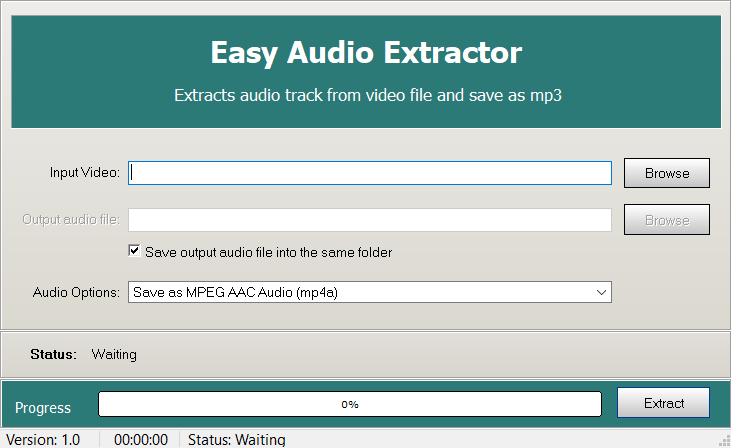
Easy Audio Extractor is a Windows utility for separating soundtracks from video files and saving them as audio. It is suited to people who want to reuse music, dialogue, or other sound from a video without working in a full video-editing suite. Its straightforward workflow keeps the task focused: add a video, choose the audio section and output settings, then create a separate audio file.
The program accepts common video containers such as MP4, AVI, and MKV. After importing a file, users can extract its audio and convert it to formats including MP3, WAV, and AAC. These options serve different needs: MP3 is widely supported for everyday playback, while WAV can be useful in workflows that call for an uncompressed audio file. AAC provides another broadly used format for compatible players and devices.
For more control over the result, Easy Audio Extractor provides output settings for bitrate and sample rate. These let users adjust how the converted audio is encoded and choose settings that suit a particular playback, storage, or editing workflow. A trimming function can limit extraction to a selected portion of the source video, which helps when only a particular song, spoken passage, or sound effect is needed rather than the entire soundtrack.
Batch processing allows audio to be extracted from multiple videos in one operation, reducing repetitive work when preparing a collection of files. Video files can be brought into the program using drag and drop, and its step-by-step interface makes the basic conversion process accessible to users without specialist audio knowledge. Extracted files can then be organized or opened in a media player or audio editor, depending on the next task.
Typical uses include saving a video's soundtrack for listening, making a short audio clip from a longer recording, and preparing source audio for further editing. Easy Audio Extractor is freeware for Windows, with support listed for Windows 10 and Windows 11 as well as earlier Windows releases. The Windows 10 and Windows 8 and 7 listings cover both 32-bit and 64-bit systems. Its purpose is audio extraction and conversion; it is not presented as a general-purpose video editor or a tool for recording new audio.