EF AutoSync for Windows 10 - Full description
EF AutoSync is a folder synchronization and file backup utility for users who need to keep two directory locations aligned. It compares the contents of a left and a right folder, then applies selected changes to one or both sides. This makes it suitable for maintaining a working copy and backup, transferring new files between locations, or keeping directory contents consistent without copying every file manually.
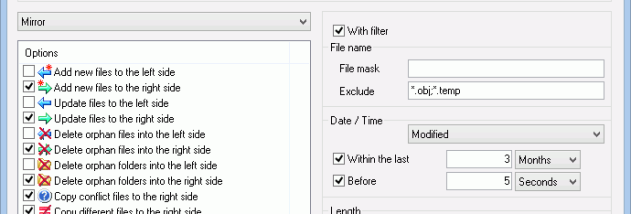
Synchronization rules determine how the two folders are changed. EF AutoSync can add new files, update existing items, and remove orphaned files or folders that have no counterpart on the other side. These actions can be directed toward the left folder, the right folder, or both, allowing a job to match the intended flow of data. For example, a one-way setup can send additions and updates to a backup location, while rules that remove orphan entries can make the destination mirror the source more closely.
The utility can process subfolders recursively, so a job can include a directory tree rather than just the files at its top level. It can also compare files by their contents, helping distinguish files based on what they contain instead of relying only on their names. Together, these options provide control over how differences are detected and what happens when a synchronization runs. The workspace is designed around choosing the folder pair and configuring the operations for that pair.
EF AutoSync runs synchronization jobs in the background and is intended to have a low effect on system performance, so file transfers can take place while other work continues. Its range of add, update, and deletion choices accommodates both simple transfers and more closely matched folder copies. Multilingual support is also included, making the interface available in multiple languages.
The program is trialware and is intended for Windows computers. Supported systems include Windows XP, Vista, 7, 8, 10, and 11, including listed 64-bit editions of Vista, 7, and 8 and 64-bit Windows 10. EF AutoSync is useful for recurring folder maintenance and straightforward backup workflows where the user wants to decide how additions, changed files, and unmatched entries are handled.