WonderFox DVD Ripper Pro
WonderFox DVD Ripper Pro is a Windows application for converting DVD ... portable device and another format for desktop playback. WonderFox DVD Ripper Pro includes DVD decryption functions intended to handle ...

HandBrake is a free, open-source video transcoder for converting video files and unencrypted DVD-like sources. It can create MP4 or MKV files using encoders such as H.264, MPEG-4 and Theora, with presets for common conversion goals and controls for custom settings. Cropping, scaling, deinterlacing, chapter selection, audio track handling and burned-in subtitles help tailor the result.
| Author: | HandBrake |
| License: | Freeware |
| Price: | FREE |
| Released: | May 20, 2024 |
| File size: | 21.70 MB |
| Downloads: | 311 |
| Keywords: | rip x64, dvd ripper x64, video to mp4 converter, dvd video converter, multi-platform, ripper x64, converter x64, HandBrake 64-bit, hand brake x64, video converter, mk v video converter, video transcoder, open-source software, video file converter, DVD ripper, handbrake video encoder, dvd converter x64, dvd to mp4 x64 |
| Author URL: | https://handbrake.fr/ |

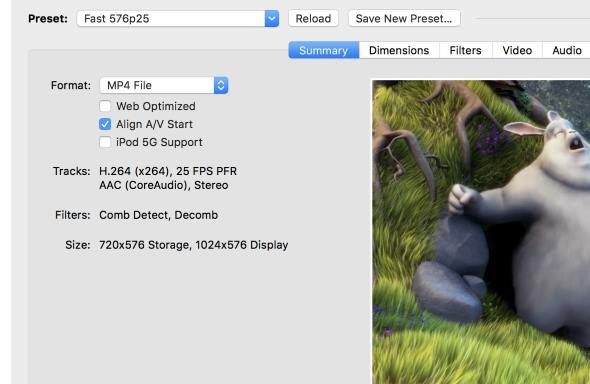
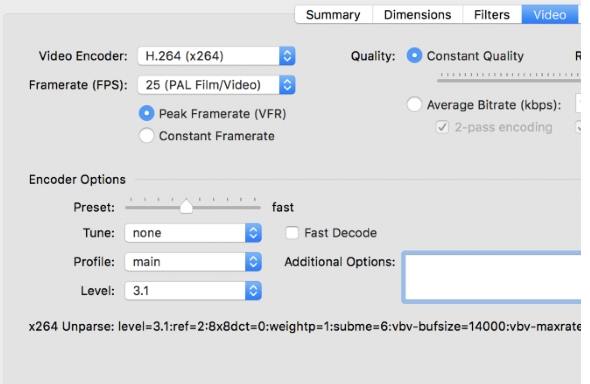
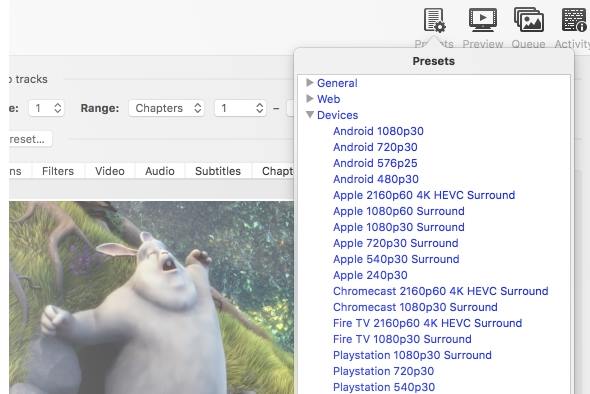

HandBrake is a free, open-source video transcoder for converting video files and unencrypted DVD-like sources into formats suited to different devices and playback needs. It is useful for people who want to reduce file size, change a video's container or encoding, or prepare a consistent set of files for a media library. The program offers ready-made profiles for common conversion goals, alongside controls for users who want to tune the output themselves.
The workflow begins by selecting a source, such as a video file, VIDEO_TS folder, DVD image or disc. HandBrake can read many multimedia formats supported by its underlying decoding libraries, as well as some VOB and TS files. A profile provides a starting point for standard or higher-quality conversions; users can then choose MP4 or MKV as the output container and select an available video encoder, including MPEG-4, H.264 or Theora. Encoding can use one or two passes, or constant quantizer or bitrate settings, depending on the desired balance between quality, file size and processing time.
Picture and audio controls help adapt an encode to its intended use. HandBrake can crop, scale and deinterlace video, and can create a grayscale output. Its bitrate calculator helps estimate settings for a target file size. Users can select chapters, encode multiple audio tracks using supported formats such as AAC, MP3, Vorbis or AC-3, or pass through DTS and AC-3 audio where applicable. Basic subtitle support allows subtitles to be burned into the image, making them visible during playback without relying on a separate subtitle track.
These tools suit tasks such as converting a collection of home videos, preparing media for devices that prefer MP4, creating smaller copies for storage, or encoding DVD footage for playback from a computer. The profile-based approach keeps routine conversions straightforward, while the encoder and picture options provide more control over specialized results. As a transcoder, HandBrake converts and re-encodes media; it is not a general-purpose video editor.
HandBrake is distributed under the GPL and is free to use. This 64-bit edition is intended for Windows PCs, including Windows 10 and Windows 11. It can work with unencrypted DVD sources, but it does not internally bypass DVD copy protection such as CSS; protected material requires separate handling with third-party software or libraries. Available source formats and output choices depend on what the program can decode and encode.