Hex Workshop
Hex Workshop is a hexadecimal editor and binary analysis toolkit for Windows, aimed at ... binary data in a form that can be edited directly while also offering tools to interpret values, ...

HexEdit is a freeware hexadecimal editor for inspecting and changing the raw contents of files. Its multiple-document interface can keep several files open, while a Data Inspector helps interpret selected values and a built-in calculator supports related work. File comparison, memory dumping and disk dumping round out its tools; disk dumping is limited to NT-based Windows systems.
| Author: | Mitec |
| License: | Freeware |
| Price: | FREE |
| Released: | Feb 24, 2021 |
| File size: | 1.04 MB |
| Downloads: | 1209 |
| Keywords: | Mitec HexEdit, binary data editing, hexadecimal editor, x64 software, hex editor, edit, data inspector, hexadecimal, hexadecimal editing tool, edit binary files, Hexadecimal Editor, file comparison tool, edit hex, memory dumper, Windows 10 compatibility, hex, raw data inspection |
| Author URL: | https://www.mitec.cz/ |
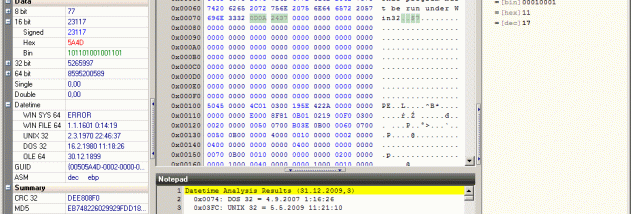

HexEdit is a hexadecimal editor for examining and changing the raw contents of files. It is suited to users who need to inspect binary data directly, such as developers, technicians and people working with file formats that are not readily readable as text. A multiple-document interface (MDI) lets several documents remain open in one application window, making it easier to move between files during an editing session.
The Data Inspector helps interpret selected data in different forms, which is useful when a sequence of bytes represents a value rather than ordinary text. A built-in calculator supports related calculations without switching to another utility. These tools complement the hex-editing workspace when investigating file structures or checking values while making changes.
HexEdit also includes a file comparison feature for checking two files for differences. Its memory dumper and disk dumper provide ways to examine data from memory and disks, extending its use beyond editing individual files. The disk dumper is limited to Windows NT-based systems, as indicated by the program's feature information.
Typical uses include investigating binary files, comparing file contents, inspecting data values and working with low-level system data. The interface combines editing, inspection and comparison tools in one utility; the MDI layout is particularly helpful when a task involves multiple files. HexEdit is freeware and is intended for Windows. Its stated compatibility includes Windows 10, while Windows 11 compatibility is not established here.