iCopy Portable
iCopy Portable turns a connected scanner and printer into ... to launch from a scanner's physical button. Once iCopy is selected as the scanner button's default application, ...

iCopy combines a scanner and printer into a simple photocopier for Windows. Select the number of copies, color mode and paper size, adjust brightness, contrast, resolution or enlargement, then start the scan-and-print job with the Copy button. It can also launch from a scanner's physical button when configured as its default application. The free, open-source program requires Microsoft .NET Framework 2.0 or later and does not require installation.
| Author: | Matteo Rossi |
| License: | Freeware |
| Price: | FREE |
| Released: | Jan 8, 2020 |
| File size: | 891 kB |
| Downloads: | 408 |
| Keywords: | copy, iCopy, icopy photocopier, scanner button copy, scanner, free photocopier software, scan and print software, document scanning, x64 software, sourceforge.net, photocopy, Matteo Rossi, document copy program, printer, Windows 10, scanner printer copier, print |
| Author URL: | http://icopy.sourceforge.net/ |
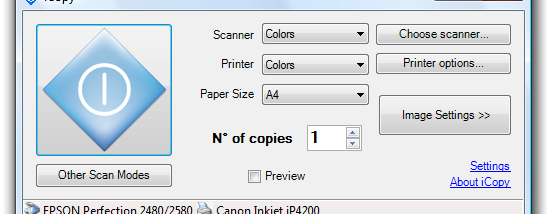

iCopy turns a computer's scanner and printer into a basic photocopier. It is intended for home users and small workplaces that need to duplicate paper documents without opening a separate image-editing or printing application. A compact window brings the copy controls together, so a scan can be sent to the printer after choosing the required settings.
The main workflow is to select the scanner and printer, set the number of copies, choose color or grayscale output, and specify a paper size. Image controls include brightness, contrast, resolution and enlargement. These adjustments help prepare a copy for legibility or change its printed size before the job starts. Once the settings are ready, the Copy button starts the scan-and-print process.
The application can also be associated with a scanner's physical button. After iCopy is selected as the button's default application, pressing the scanner button can launch iCopy, reducing the steps needed for routine copies. Scanner and printer options are managed from the same interface, while the copy count and image settings remain available before printing.
Typical uses include copying letters, forms, receipts and other paper documents when a standalone photocopier is not available. Color selection and image adjustments provide basic control over the result, while the copy-count setting supports making multiple copies in one job. The program focuses on this direct scanner-to-printer workflow rather than broader document management or image editing.
iCopy is free and open-source software for Windows. It requires Microsoft .NET Framework 2.0 or later, and the provided compatibility information includes Windows versions through Windows 10. The application is small and does not require installation, so it can also be kept on a USB drive. Actual operation depends on having a compatible scanner and printer connected to the computer.