abylon UAC-GRABBER
Welcome to the download page for the innovative "abylon UAC-GRABBER" software, a unique product of abylonsoft, developed by the renowned Dr. Thomas Klabunde. This software is ...

iReboot is a Windows taskbar utility for computers with multiple operating systems installed. It lets users choose which system should start at the next restart, avoiding the need to catch a boot menu before its countdown expires. The computer still restarts through its usual process, and iReboot works with the existing bootloader configuration rather than installing or replacing one. It is useful for regularly switching between Windows installations or between Windows and another operating system.
| Author: | NeoSmart Technologies |
| License: | Shareware |
| Price: | $10.00 |
| Released: | May 25, 2015 |
| File size: | 307 kB |
| Downloads: | 414 |
| Keywords: | NeoSmart Technologies, Restart System, Restarter, dual boot reboot tool, windows reboot helper, system reboot tool, Windows 10 compatibility, Reboot, choose operating system at startup, ireboot download, user-friendly interface, Restart, System Reboot, x64 software, iReboot, boot menu selector, switch operating systems |
| Author URL: | https://neosmart.net/ |
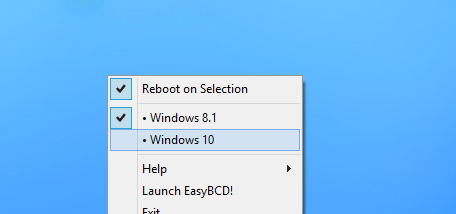

iReboot is a Windows utility for people who have more than one operating system installed and need to switch between them regularly. It adds a small control to the taskbar, where users can choose which operating system should start the next time Windows reboots. This avoids having to watch for the boot menu and select an entry during its countdown.
After choosing an operating system in iReboot, the user restarts Windows as usual. The computer then starts the selected system, using the existing bootloader configuration. This is useful when switching between Windows installations or between Windows and another operating system on a dual-boot computer. iReboot selects a boot option; it does not install operating systems or replace the bootloader.
The utility is designed to remain available from the taskbar while Windows is running, making the boot choice part of the normal desktop workflow. Rather than changing the default system permanently, the user can make a selection for an upcoming restart and return to the usual boot process afterward. The choice is particularly helpful when the boot menu is configured to appear briefly or when the computer is unattended during restart.
Typical uses include moving between a work and personal Windows installation, starting a separate system for testing, or switching to another operating system for a particular task. It is most relevant on computers where the bootloader already presents multiple operating systems. With only one boot option configured, there is no alternate system for iReboot to select.
iReboot is a lightweight desktop helper from NeoSmart Technologies. Its listed Windows support includes Windows 7, Windows 8 and Windows 10, including 64-bit editions; Windows 11 support is not established here. The program relies on a working multi-boot setup, since the available choices come from the computer's boot configuration.