
LWBlat GUI

LWBlat GUI 1.4.3

Graphical frontend for the Blat email sender

LWBlat GUI is a portable graphical frontend for Blat, the console-based email-sending utility. It lets users access Blat's sending options through a visual interface instead of entering command-line arguments by hand. The program is intended for people who want Blat's configurable email workflow with a more approachable way to set it up.

LWBlat GUI 1.4.3 details

Author:
License: Open Source
Price: FREE
Released:
File size: 1.00 MB
Downloads: 268
Keywords: Send email, send email with blat, blat frontend, Sender, e-mail sender, email sending tool, open-source software, GUI, Blat GUI, portable email tool, email sender utility, Lior Computer Consulting, graphical email sender, blat gui, LWBlat GUI, Blat, Windows 10 software, x64 application
Author URL: https://github.com/lwcorp/lwserver
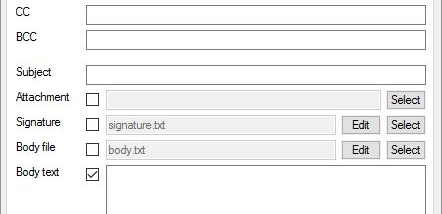
LWBlat GUI screenshot
LWBlat GUIE-Mail ClientsWindows 11, Windows 10 32/64 bit, Windows 8 32/64 bit, Windows 7 32/64 bit, Windows Vista, Windows XP 32/64 bit, Windows 2K

User Rating: 0 (0 votes)

LWBlat GUI Awards

Windows 10 download editor's pick

LWBlat GUI for Windows 10 - Full description

LWBlat GUI is a portable graphical frontend for Blat, a console-based utility for sending email. It gives users who prefer a visual interface a way to configure Blat's email-sending options without entering each setting as a command in a terminal. It is suited to people who use Blat for routine messages, scripted tasks or other workflows where a lightweight email sender is useful.

The interface provides access to Blat's sending options, allowing users to prepare email settings through graphical controls rather than assembling command-line arguments by hand. Blat handles the actual sending, while LWBlat GUI acts as the layer for entering and managing the choices that control a message. This can make less familiar options easier to work with and reduce the need to remember command syntax.

Because the program is a frontend rather than a replacement for Blat, it is intended for use alongside that console utility. Users can work with Blat's range of email-sending parameters through the GUI, then use the resulting configuration as part of their email workflow. The portable format is convenient for keeping the utility available without a conventional installation process.

LWBlat GUI is useful for users who need Blat's command-line sending capabilities but would rather set options visually, including people preparing repeatable email tasks. It is open-source software and is offered at no cost. The program is designed for Windows, with support listed for Windows 10 and other earlier Windows releases; its small download size makes it practical to keep with related tools. The underlying Blat utility is required for the frontend's email-sending function.

LWBlat GUI for Windows 10 - Post your review