MailBell for Windows 10 - Full description
MailBell is a system-tray email checker for people who want to monitor several mail accounts without keeping a full email client open. It periodically checks supported accounts and signals when messages arrive. By showing the message count in its tray icon and offering a compact notification window, it provides a quick way to notice incoming mail and open the associated mail program when needed.
The utility checks POP3, IMAP4, IMAP-SSL and MAPI accounts, and also supports Hotmail Premium accounts. Multiple accounts can be monitored at once, including over local networks and persistent internet connections. For dial-up connections, MailBell detects when the computer goes online and can then perform its checks. This makes it useful in different connection setups, rather than requiring a continuously active connection for every account.
When new mail is found, MailBell can play a sound, display a configurable notification, or start the mail client automatically. Notifications can be adjusted, including their color and font, and can be used to launch the mail program. MailBell can also open the mail client from its tray icon and provides a shortcut for composing a new message. Different handling rules let it respond to message contents, such as suppressing sounds for unwanted mail. Icons distinguish messages from friends or messages containing selected unwanted words.
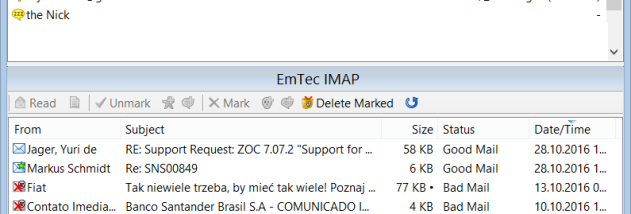
A message list in the MailBell window lets users inspect inbox contents before opening the email client. Messages can be previewed without downloading them to that client, and unwanted messages can be deleted directly from the server. These options can help avoid downloading large attachments or bringing potentially unsafe messages into the regular mail workflow. The tray icon also shows the number of available messages, while included sound files provide notification options.
MailBell is trialware and is intended for Windows systems; the stated operating-system support includes Windows XP through Windows 10, in 32-bit and 64-bit editions where available. Its background checks, account controls and message list are aimed at users who want lightweight email monitoring alongside their existing mail program. It does not replace that program for ordinary reading and composing, but adds a separate way to notice, sort and remove incoming messages before downloading them.