Mark Text for Windows 10 - Full description
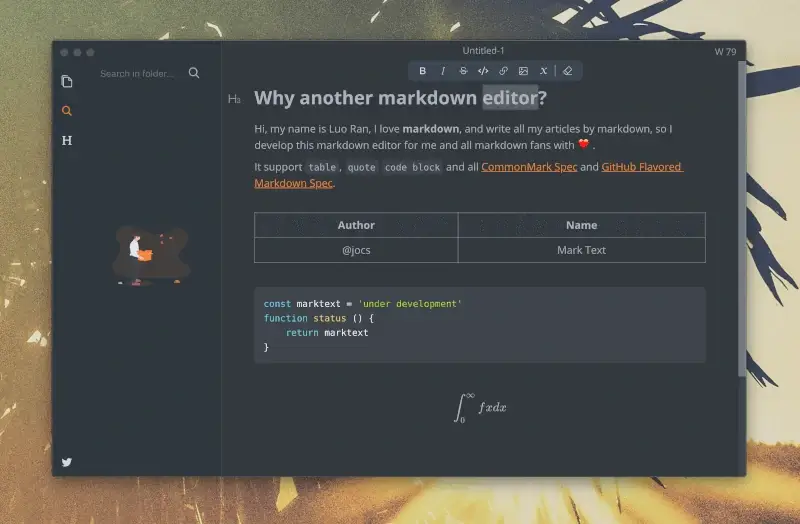
Mark Text is an open-source Markdown editor for writers, students, developers and anyone who needs to prepare structured text without composing directly in a word processor. It combines plain-text editing with an interface that displays formatting as the document is written, making headings, links, lists and other Markdown elements easier to work with. Existing plain-text notes and documents can also be opened for editing.
The editor supports common Markdown content, including headings, tables, hyperlinks, images, block quotes, code fences, bullet lists and strikethrough text. These elements help organize everything from a short memo to technical documentation. Standard editing commands such as copy, paste, find, replace, undo and redo support routine changes, while headings can be adjusted in level as a document's structure develops.
For longer writing sessions, Focus mode emphasizes the paragraph or sentence being edited, helping keep attention on one section of a dense document. Source code mode provides a view of the underlying Markdown and applies syntax highlighting, which is useful when checking markup or working with code snippets. Light and dark themes offer alternative editor appearances, and emoji support lets writers include symbols directly in their text.
Completed documents can be exported as PDF or HTML, with simple or styled output options. PDF is suited to sharing a fixed-layout copy, while HTML can be used on websites or in other tools that accept web content. This makes the editor useful for drafting notes, reports, lists, emails, web content and technical material, then producing a format suited to its next destination.
Mark Text is free and open source, and the supplied Windows download is for 64-bit Windows 10 and Windows 11. Its Markdown-based workflow keeps the source in plain text while providing familiar document structure and export choices, so it can serve both occasional note-taking and more involved writing tasks. The editor is focused on composing and formatting Markdown rather than replacing a full word processor or a specialized publishing system.