Video Rotator and Flipper
Welcome to the ultimate destination for your video editing needs! We present to you "Video Rotator and Flipper" by 4dots Software, a revolutionary tool designed to enhance your video ...

mediaChips is a media organizer for cataloging and finding video and other media files. It uses tags, keyword search, and filters for file type or date to help narrow large collections. Drag-and-drop organization and customizable views support different workflows, while cloud storage integration can sync collections across devices. It is open source and runs on 64-bit Windows 10 and Windows 11.
| Author: | fupdec |
| License: | Open Source |
| Price: | FREE |
| Released: | Feb 18, 2025 |
| File size: | 207.00 MB |
| Downloads: | 198 |
| Keywords: | organizer, mediaChips, video manager, multimedia organization tool, download mediaChips, editing, mediaChips free download, multimedia, fupdec, metadata, cross-platform compatibility, video organizer, video library manager, manager, media tagging software, media file catalog, media organizer, video, fupdec software, software, media collection search, mediaChips review, tools, organize video, intuitive user interface, Windows 10 media management |
| Author URL: | https://mediachips.app/ |
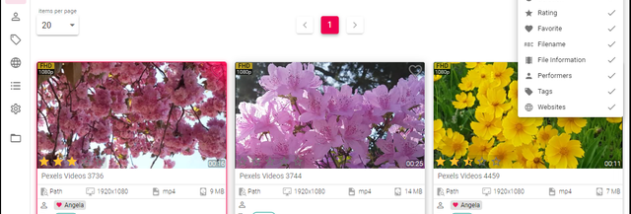


mediaChips is a media library organizer for people who want to catalog and retrieve video and other media files from a single workspace. Its tagging tools help group files by subject, project, or another category that suits the collection, making it easier to locate items than browsing through folders alone. The software is intended for both personal libraries and larger collections where consistent organization and search are useful.
Files can be arranged using drag-and-drop, and customizable views let users shape the workspace around their preferred way of browsing. Tags provide a flexible way to categorize media, while search helps find files by keyword. Filtering can narrow results by file type or date, or use custom tags to focus on a particular part of the library. These tools are useful when a collection contains many files and a manual folder-by-folder search would take longer.
The program supports a range of media formats, so different kinds of files can be managed in the same catalog. Its interface brings organization and retrieval tasks together, allowing users to add structure to a collection and then browse or search it as needed. Cloud storage integration is also included for syncing media collections across devices. This can help maintain access to an organized collection from more than one device, depending on the cloud services and setup in use.
mediaChips can be used to sort personal video libraries, keep project media accessible, or manage larger collections that need searchable tags and filters. Users who mainly need playback or editing tools may prefer a dedicated media player or editor; mediaChips is focused on managing and finding files rather than replacing those applications. The organization features are most useful when users apply tags consistently and make use of the available search and filtering options.
The software is open source and free to use. It is available for 64-bit Windows 10 and Windows 11. The download is approximately 207 MB. Users should check their available disk space before installation and consider how their chosen cloud storage service handles synchronization when managing large collections.