MetatOGGer for Windows 10 - Full description
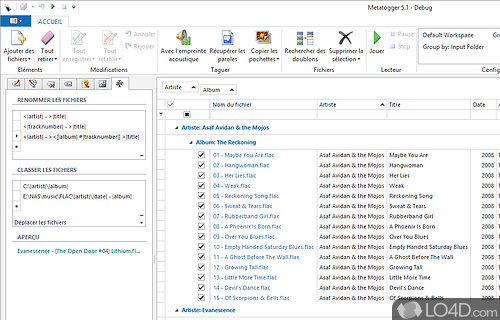
MetatOGGer is a music library manager for listeners and collectors who need to keep audio files consistently tagged and organized. It handles metadata editing and file renaming across common formats, including MP3, FLAC, OGG, WMA and M4A. Instead of editing tracks one at a time, users can load groups of files into its workspace and apply changes across a collection.
The program can retrieve track information from online services such as Discogs and MusicBrainz, helping fill in or correct fields like artist, album and track number. It can also obtain cover art for supported files. Once the metadata is in place, files can be renamed from their tags, which makes it easier to create predictable folder and filename structures. Drag-and-drop file handling provides a direct way to add music to a session.
For recurring cleanup work, MetatOGGer supports custom scripts that automate operations such as applying tags or renaming tracks according to their metadata. This can reduce repetitive editing when managing a large library or enforcing a consistent naming scheme. Duplicate detection helps locate repeated tracks, with options to merge or delete them. A built-in player lets users listen to tracks while checking that the tags match the audio; gapless playback is useful when reviewing albums intended to play without breaks. The software can also generate QR codes for music files.
These tools suit both routine maintenance and larger organizing projects: a listener can correct incomplete album details, standardize filenames, check for duplicate files and review the results in one workflow. Database lookup is useful when entering tags manually would be slow, while scripts help repeat the same rules across many files. Listening inside the application provides an additional check before changes are considered complete.
MetatOGGer is freeware from Luminescence for 64-bit Windows 10 and Windows 11. It requires .NET Framework 4.7.2 or later. Its format support covers several widely used audio types, although the available tagging fields and behavior can vary by format. Online metadata retrieval depends on access to the supported services.