MicroDicom x64
MicroDicom x64 is a DICOM viewer and image-processing application ... directory files. When a directory file is loaded, MicroDicom can display its patient list, making it easier ...

MicroDicom is a freeware Windows viewer for medical images in DICOM format. It opens individual images and DICOM directory files, displays patient lists and studies from DICOMDIR collections, and can also load common image formats. Viewing tools include zoom, pan, brightness and contrast controls, plus access to image attributes. Images can be saved as DICOM or converted to common picture formats, AVI or the clipboard. It can run from patient CD or DVD without installation.
| Author: | Simeon Antonov Stoykov |
| License: | Freeware |
| Price: | FREE |
| Released: | Jun 6, 2024 |
| File size: | 10.00 MB |
| Downloads: | 319 |
| Keywords: | DICOM, Simeon Antonov Stoykov, dicom image converter, x64 architecture, dicomdir viewer, DICOM image editor, MicroDicom, Windows 10 compatible, medical image viewer, dicom image viewer, DICOM viewer, view, open dicom files, medical imaging software, edit DICOM image, viewer, view dicom on cd, view DICOM image |
| Author URL: | http://www.microdicom.com/ |
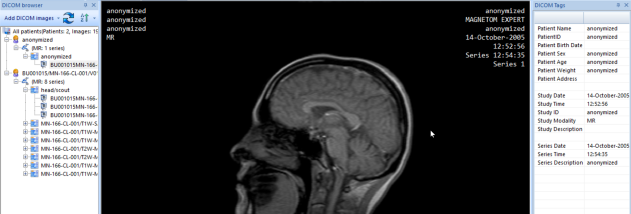

MicroDicom is a Windows application for opening, viewing and performing basic image processing on medical images stored in DICOM format. It is intended for people who need to inspect imaging files on a computer, including patients viewing studies supplied on disc and users handling DICOM images in a clinical or educational workflow. It also opens common picture formats, so standard image files can be viewed alongside medical scans.
The viewer can load individual images and DICOM directory files, including by drag and drop or by opening a file directly. For DICOMDIR collections, it displays the patient list and provides access to images grouped across different studies or examinations. This helps users browse the contents of a disc or directory without opening each image separately. Images can be saved in DICOM format, while conversion options export them to common picture formats, an AVI movie file or the clipboard.
Viewing controls include zooming and panning to examine different areas of an image, along with brightness and contrast adjustments that change its on-screen appearance. Image-processing tools support basic manipulation of DICOM images, and the application can display the selected image's DICOM attributes. These details provide access to information stored with the image, while the viewing controls help users inspect its visual content. Such operations are for viewing and handling image files; they do not replace professional interpretation or medical advice.
MicroDicom is useful for browsing medical images received on CD or DVD, reviewing DICOM files stored locally, and converting images for use in presentations or other workflows. Its support for viewing images from multiple examinations is also practical when a collection contains more than one study. The program can run from patient media without installation, which makes it possible to view a disc's contents on a compatible Windows computer without setting up the application first.
The software is freeware and supports both x86 and x64 editions of Windows. Its functions focus on primary image viewing, basic manipulation, file conversion and access to DICOM directory contents rather than replacing a full medical imaging or diagnostic system. Availability of specific functions can depend on the files being opened and the Windows environment in use.