Portable MicroDicom x64
Portable MicroDicom x64 is a freeware viewer and basic processing tool ... files. When a directory contains a DICOMDIR index, MicroDicom can show its patient list and let users ...

MicroDicom x64 is a freeware DICOM viewer for opening, reviewing, and saving medical images. It browses DICOM directory files and patient lists, displays images from different studies, and provides brightness and contrast controls, zooming, and panning. Users can inspect image attributes, perform common processing operations, and export images to familiar formats, AVI, or the clipboard. It can also open common graphic files.
| Author: | Simeon Antonov Stoykov |
| License: | Freeware |
| Price: | FREE |
| Released: | Jun 6, 2024 |
| File size: | 11.00 MB |
| Downloads: | 446 |
| Keywords: | dicom image editor, x64 view, Simeon Antonov Stoykov, x64 viewer, x64 DICOM image editor, x64 view DICOM image, dicom study browser, Medical imaging software, x64 DICOM, dicom to jpeg converter, PACS viewer, dicom file reader, DICOM viewer, medical image viewer, x64 edit DICOM image, dicom image viewer, Windows 10 compatible, MicroDicom x64 |
| Author URL: | http://www.microdicom.com/ |
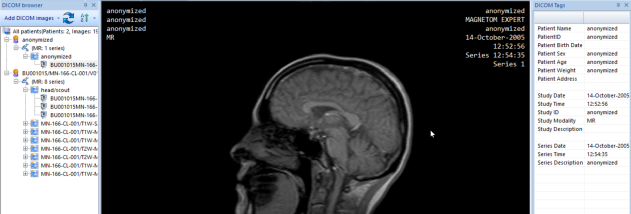

MicroDicom x64 is a DICOM viewer and image-processing application for opening, reviewing, and saving medical images. It is intended for healthcare professionals, students, and other users who need to work with DICOM studies on a Windows computer. The interface brings image viewing and common manipulation tools together, while patient and study information can be accessed alongside the images.
The program opens individual DICOM images as well as DICOM directory files. When a directory file is loaded, MicroDicom can display its patient list, making it easier to browse the studies stored on a disc or in a folder. Images from different studies or examinations can also be displayed. Files can be loaded by dragging and dropping them into the application or by double-clicking them, offering a direct way to inspect a study without first navigating through multiple menus.
Viewing tools include brightness and contrast adjustment, zooming, and panning. These controls help users examine image detail and adjust its appearance during review. MicroDicom also displays the DICOM attributes associated with a selected image, so users can inspect its embedded information. Common image-processing operations are available for working with the medical images, and the application can save DICOM files as well as open them.
For sharing or use in other applications, DICOM images can be converted to common picture formats such as JPEG, BMP, and GIF, to AVI movie files, or copied to the clipboard. MicroDicom can also open images in those common graphic formats. Its support for patient CDs and DVDs makes it useful for viewing studies distributed on removable media; the program can run from such media without installation, according to its portable-disc use case.
MicroDicom is freeware and is available as a 64-bit Windows application. It is suited to primary image viewing and processing rather than replacing specialized clinical systems or professional diagnostic workflows. Its combination of DICOM browsing, basic image controls, attribute display, and export options can serve routine review, education, and image-sharing tasks on supported Windows computers.