Portable MicroDicom x64
Portable MicroDicom x64 is a freeware viewer and basic processing ... review imaging studies on a Windows computer. Its portable form is useful when images need to be ...

Portable MicroDicom is a free DICOM viewer and basic medical-image processing tool. It opens and saves DICOM images and directory files, displays patient lists and studies, and provides brightness, contrast, zoom and pan controls. Images can be exported to common picture formats, AVI or the clipboard. Its portable design supports viewing images from patient CD or DVD without installation.
| Author: | Simeon Antonov Stoykov |
| License: | Freeware |
| Price: | FREE |
| Released: | Jun 6, 2024 |
| File size: | 11.00 MB |
| Downloads: | 343 |
| Keywords: | dicom file reader, view, dicom image viewer, DICOM image editor, Portable MicroDicom, x64 architecture, dicom image processing, medical imaging software, medical image viewer, view DICOM image, DICOM, dicom to jpg converter, portable dicom viewer, edit DICOM image, viewer, Simeon Antonov Stoykov, Windows 10 compatibility, DICOM viewer |
| Author URL: | http://www.microdicom.com/ |
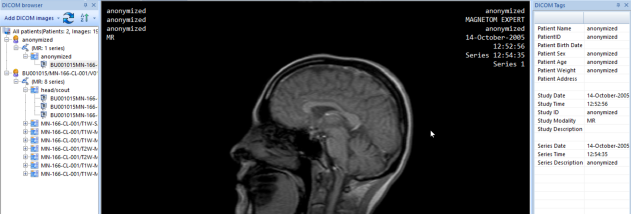

Portable MicroDicom is a freeware DICOM viewer and basic medical-image processing tool for examining and preserving images from medical imaging studies. It is intended for healthcare professionals, students and others who need to open DICOM files, inspect image data and perform common viewing adjustments. Its portable form is also useful when images need to be viewed on a computer without installing the application, such as from patient media.
The program opens and saves DICOM images, as well as DICOM directory files. When a directory file contains a patient list, MicroDicom can display it so users can browse the available studies and examinations. Images from different studies can be viewed in the same workflow. Files can be loaded by dragging and dropping them into the application or by opening them directly, including with a double-click.
Viewing controls include brightness and contrast adjustment, zooming and panning. These tools help make image details easier to inspect and navigate within larger images. MicroDicom can also display the DICOM attributes associated with a selected image, providing access to its embedded information alongside the visual content. Common medical-image processing operations are available for basic manipulation; the application is intended for primary processing rather than as a replacement for specialized diagnostic systems.
For sharing or use in other applications, images can be converted to common picture formats, copied to the clipboard or assembled into an AVI movie file. MicroDicom also opens everyday graphic formats such as JPEG, BMP and GIF, allowing those images to be handled alongside DICOM files. Together, these options support tasks such as reviewing a study, preparing an image for a presentation or exporting material for a compatible workflow.
Portable MicroDicom is free to use and runs on Windows, with Windows 10 among the supported systems. It is available for x86 and x64 platforms. The portable version can be carried on removable storage or included on patient CD or DVD media, letting recipients view DICOM images without installing the program. Compatibility with newer Windows releases should be checked before use.