Free Download Manager
Discover the power of seamless downloads with Free Download Manager, a top-tier software developed by FreeDownloadManager.ORG. This Windows 10 compatible software is your one-stop solution for managing all ...

Microsoft Web Platform Installer (WebPI) is a free Windows utility for installing Microsoft web technologies and common web applications. It can set up components such as IIS, SQL Server Express, the .NET Framework and Visual Studio, and provides access to the Windows Web Application Gallery for blogging and content management software. An internet connection is required.
| Author: | Microsoft |
| License: | Freeware |
| Price: | FREE |
| Released: | May 1, 2015 |
| File size: | 1.77 MB |
| Downloads: | 552 |
| Keywords: | Microsoft-developed, Download, Component Downloader, x64 software, software management utility, web development tool, Windows 10 compatible, Component, windows web application gallery, iis installer, web application installer, Microsoft Web Platform Installer, Downloader, microsoft webpi, Component Installer, Download Component, web platform installer, sql server express installer |
| Author URL: | https://www.microsoft.com |
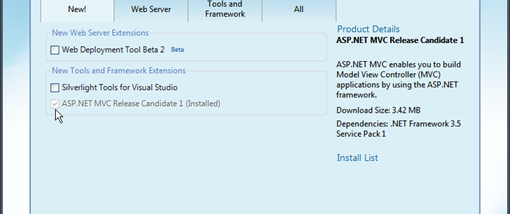

Microsoft Web Platform Installer, also known as WebPI, is a free utility for setting up web development and hosting components on Windows. It is intended for developers, administrators and users who want a guided way to add Microsoft web technologies or install common web applications without gathering each component separately. An internet connection lets the installer retrieve the packages and application options available through its catalogs.
WebPI can install platform components such as Internet Information Services (IIS), SQL Server Express, the .NET Framework and Visual Studio. These tools support different stages of web work: IIS provides a local web server for hosting and testing sites, SQL Server Express supplies a database engine, and Visual Studio provides a development environment. The installer helps users select the components they need and handles their installation as part of a single workflow.
The built-in Windows Web Application Gallery offers free web applications for tasks such as blogging and content management. Rather than manually locating an application and assembling its prerequisites, users can browse the available choices in the gallery and use WebPI to install an application and its required web platform components. WebPI can also help keep installed Microsoft Web Platform components up to date, reducing the need to check each component individually.
The tool is useful when preparing a Windows machine for local web development, creating a basic hosting environment, or setting up a supported web application. Its catalog-based approach is most helpful for users who want a straightforward installation process; it is not itself a web editor, server, database or content management system. The selected components provide those functions after installation.
WebPI is freeware and requires an internet connection to download components. The stated system requirement includes .NET Framework 2.0. Compatibility information includes Windows XP, Vista, 7, 8 and 10, including the x64 editions noted for several of those systems. The installer is a Windows desktop utility, and the components it offers may have their own requirements.