Tab Suspender
Introducing Tab Suspender, the ultimate productivity tool for Windows 10 ... who juggle multiple browser tabs daily. Developed by tab-suspender.com, this innovative software intelligently manages your open tabs, ...

Auto Tab Discard is a Chrome extension that frees memory by discarding inactive pages without closing their tabs. Users can set time-based or tab-count rules, whitelist sites that should stay active, and optionally delete long-idle tabs. Selecting a discarded tab reloads its page, while a gray indicator marks its inactive state.
| Author: | Richard Neomy |
| License: | Freeware |
| Price: | FREE |
| Released: | Oct 6, 2026 |
| File size: | 164 kB |
| Downloads: | 25 |
| Keywords: | manage browser tabs, speed up browser, tab discarding extension, memory, Auto Tab Discard for Chrome, auto tab discard, Chrome browser extension, kill tab, download Auto Tab Discard for Chrome, resources, discard inactive tabs, inactive tab disca, tab, free up browser memory, discard inactive tab, Auto Tab Discard for Chrome free download, Auto Tab Discard, chrome memory saver, discard |
| Author URL: | https://chrome.google.com/webstore/detail/auto-tab-discard/jhnleheckmknfcgijgkadoemagpecfol |

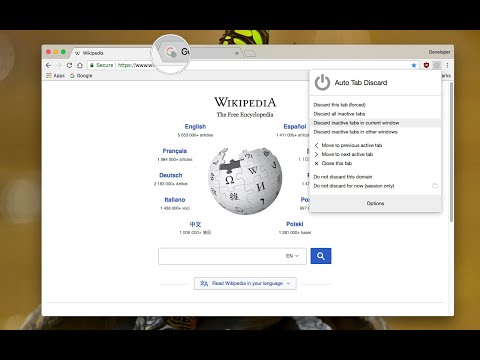
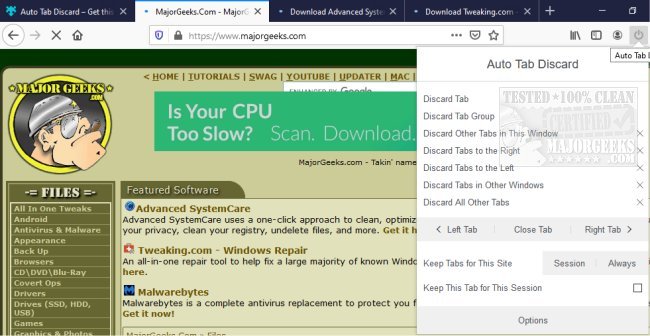
Auto Tab Discard is a Chrome extension for people who keep many browser tabs open and want to reduce the memory and processor resources those tabs use while inactive. Instead of closing a tab, it discards the page from memory. The tab remains in the tab strip, so its place is preserved and it can be reopened when needed. This approach can help limit the impact of background pages without requiring users to manage every tab manually.
The extension can discard tabs according to time or tab-count conditions. Users can set an inactivity interval, or configure a limit so that tabs are discarded after the number of open tabs passes a chosen threshold. A discarded tab no longer runs its background scripts or uses memory for the loaded page. Its icon receives a gray indicator, making it possible to distinguish discarded tabs from pages that are still active. These controls help tailor resource saving to different browsing habits, from a modest collection of reference pages to a large session kept open throughout the day.
Discarding does not remove the tab or preserve its loaded page in memory. When a discarded tab is selected, Chrome reloads the page and displays its contents again. The extension also provides a whitelist for sites that should remain active, regardless of the configured time or tab limits. For tabs that have remained inactive for a user-defined number of hours, an option can permanently delete them rather than simply discard them. The distinction is useful when a tab should be retained for later but does not need to stay loaded, or when old tabs should eventually be removed altogether.
Auto Tab Discard suits research, shopping, work, and other browsing sessions where many pages are kept open for future reference. It can reduce the resources used by inactive tabs on systems of any performance level, while keeping tabs available in the browser for later access. Users should expect a reload when returning to a discarded page; unsaved page state or activity that depends on a continuously running page may not remain available. Whitelisting important sites can help avoid discarding pages that need to stay active. The extension is freeware and is intended for Chrome; the Windows download listing supports Windows 10 and Windows 11, including 32-bit and 64-bit editions.