DJ Mixer Express for Windows
Welcome to the home of DJ Mixer Express for Windows, a top-tier software developed by ... level of ease and sophistication that is unparalleled. DJ Mixer Express for Windows stands out with its intuitive ...

Mixxx is open-source DJ software for preparing and performing music sets. DJs can load tracks into multiple decks, follow their waveforms, balance and crossfade audio, and apply effects such as reverb or auto-pan. Samplers add triggered audio clips to a set, while configurable panels let users adapt the workspace. The software can also broadcast mixes to Shoutcast and Icecast servers.
| Author: | Tue Haste Andersen |
| License: | Open Source |
| Price: | FREE |
| Released: | Oct 31, 2026 |
| File size: | 114.00 MB |
| Downloads: | 597 |
| Keywords: | open-source software, mix music with effects, Windows 10 compatible, mix, dj system, mixer, dj mixing software, four deck dj mixer, Tue Haste Andersen, DJ mixing tool, x64 architecture, mp3 mixer, music mixing program, Mixxx software, broadcast dj mix, open source dj software, mix mp3 |
| Author URL: | https://mixxx.org/ |

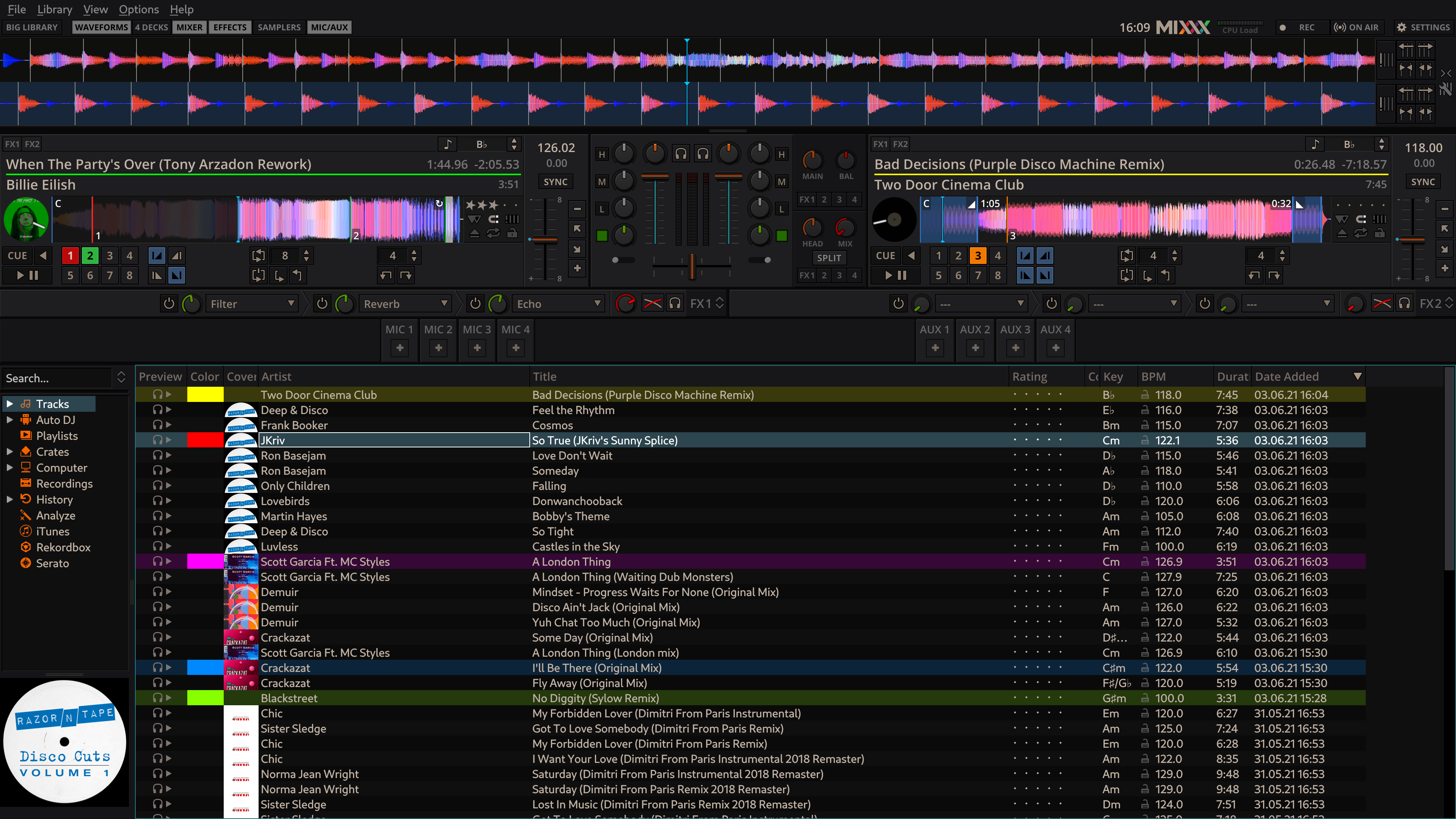



Mixxx is open-source DJ software for preparing and performing music sets on a computer. It gives DJs a workspace for loading tracks, blending songs and shaping sound during a live performance or recorded mix. Its configurable layout suits both straightforward two-track mixing and more involved setups, with panels that can be arranged around the tools a performer needs.
The deck and waveform views help DJs follow playback and coordinate transitions. Mixxx can display multiple decks, including a four-deck layout for combining more tracks at once. Waveforms make changes in a song easier to follow visually, while the mixer controls provide a place to balance and crossfade between tracks. Effects such as reverb and auto-pan can be applied to alter the sound, and samplers let performers trigger audio snippets alongside the main tracks.
The interface is divided into configurable sections, so users can show or hide elements such as decks, effects, samplers and microphone or auxiliary inputs. The MIC/AUX section supports up to eight input devices, useful for incorporating microphones or other audio sources into a set. Preferences include interface skin and layout options; available skins can change the arrangement and the number of sampler controls shown. This flexibility lets a setup be tailored to the equipment and style of a particular performance rather than requiring every panel to remain visible.
Mixxx also includes in-app broadcasting to Shoutcast and Icecast servers, allowing a DJ set to be streamed as it is performed. The combination of track mixing, effects, sampling and broadcast tools makes it suitable for home practice, live DJ sets and online radio-style shows. A smaller two-deck setup can keep the workspace focused, while additional decks and input sources support more layered performances.
Mixxx is free and open-source software for 64-bit Windows 10 and Windows 11. Its modular interface offers room to adapt as a DJ's workflow develops, while the range of panels and controls may take time to explore. It is intended for music mixing and performance rather than general-purpose audio editing.