Voice Again
Welcome to the Windows 10 download page for "Voice Again", an innovative software developed by the renowned Screaming Bee LLC. This software is a game-changer for ...

Moo0 VoiceRecorder is a simple Windows utility for capturing voice and other sounds with a single click. It saves recordings as WAV or MP3, with an adjustable MP3 quality setting to balance sound detail and file size. Timer controls allow recording to start or stop at set times or after a maximum duration, making it useful for singing practice and basic scheduled recordings.
| Author: | Moo0 |
| License: | Freeware |
| Price: | FREE |
| Released: | Jun 29, 2019 |
| File size: | 4.10 MB |
| Downloads: | 471 |
| Keywords: | Sound Capture, recorder, record singing practice, Windows 10 compatible, mp3 sound recorder, high-quality sound, Voice Recorder, Moo0 VoiceRecorder, lightweight application, moo0 voice recorder, voice, audio recording software, wav recorder, voice recording software, user-friendly interface, audio recorder, capture, Audio Recorder |
| Author URL: | https://www.moo0.com/ |
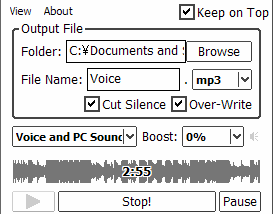

Moo0 VoiceRecorder is a lightweight desktop audio recorder for capturing voice and other sounds on a Windows PC. Its simple, single-click recording workflow suits beginners who want to start recording without configuring a complex audio workstation, while its settings also offer a few practical controls for regular use. Singers can use it to record practice sessions and listen back to their performance, and it can also serve for quick spoken recordings or other basic sound capture.
The program saves recordings in either WAV or MP3 format. WAV is a straightforward choice when an uncompressed recording is preferred, while MP3 provides a compressed file that takes up less storage. For MP3 recordings, a quality setting lets users adjust the encoding quality to suit their needs. Higher quality can be useful when sound detail matters, while a smaller file may be more convenient for routine recordings.
Timer controls support scheduled and duration-limited recordings. A settings option displays a panel for setting a start time, end time, or maximum recording duration, so a session can begin or stop according to a plan rather than relying only on manual operation. These controls can help with timed practice or capturing a sound source when continuous hands-on control is inconvenient.
Moo0 VoiceRecorder is intended for straightforward recording rather than multitrack editing or production. Its focused workflow makes it suitable for short voice notes, singing practice, and basic audio capture where choosing an output format and, for MP3, a recording quality are the main requirements. It is freeware and supports Windows versions from XP through Windows 10, including 64-bit editions where indicated. Windows 11 support is not established by the available compatibility information.