Movavi Video Suite
Welcome to the download page for Movavi Video Suite, a powerful software developed by Movavi LTD for Windows 10 users. This all-in-one video editing suite offers a wide range of tools ...

Movavi Video Suite combines video editing, conversion, capture and disc-authoring tools in one application. It can split and join clips, remove unwanted footage, add titles, soundtracks, transitions and effects, and create photo slideshows. Capture options cover webcams, microphones, external video sources and computer screens. The suite also converts video, audio and image files, prepares media for mobile devices, and burns projects to CD, DVD or Blu-ray.
| Author: | MOVAVI |
| License: | Shareware |
| Price: | $59.95 |
| Released: | Nov 17, 2014 |
| File size: | 96.10 MB |
| Downloads: | 348 |
| Keywords: | make video, x64 architecture, video editing software, video converter, video splitter, movavi video suite, merge video, video software, video capture, video tools, video maker, sceen capture, burn video, video editor, join video, edit video, Windows 10 compatible, burner, split video, enhance video, MOVAVI, Movavi Video Suite, create video, dvd burning software, multimedia creation, screen recording software, photo slideshow maker |
| Author URL: | http://www.movavi.com |
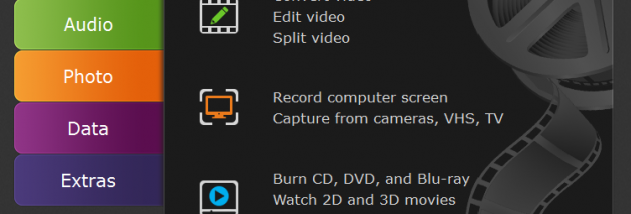

Movavi Video Suite is a collection of video editing, conversion, capture and disc-authoring tools for people who want to handle common media tasks in one application. It supports making movies and photo slideshows, editing existing footage, preparing files for playback on other devices and digitizing recordings from sources such as VHS. Its range of tools also suits users who need to capture computer activity or make quick changes without switching between separate programs.
The editing tools can split clips, join files and remove unwanted sections. Projects can combine video with a custom soundtrack and text titles, while transitions help connect clips and effects such as slow motion and tilt shift change their appearance. Filters can be applied to improve video quality, and the editor handles both 2D and 3D footage. For slideshows, users can arrange photos and add transitions to create a presentation from still images.
The suite also records video from a webcam and audio from a microphone, and can capture video and sound from external devices, including DV, HD and HDV cameras, TV tuners and VHS capture equipment. Screen recording can save computer activity, including streaming video, webinars and video chats. For calls and chats, speaker audio and microphone input can be recorded together. These capture options provide a way to bring new footage into an editing project as well as archive material from older sources.
Conversion tools handle video and audio in more than 200 formats, including DVD, HD, Ultra HD 4K and Flash video. Device presets prepare converted files for smartphones, tablets, media players and game consoles. Video can also be edited, volume-normalized or enhanced before conversion, and presets can upscale SD footage to HD. The suite converts images between common formats such as JPG, PNG and BMP. It can burn projects to CD, DVD or Blu-ray, or share files online from within the program.
Movavi Video Suite is shareware and is intended for Windows systems. The supplied system requirements cover Windows 2000, XP, Vista, 7 and 8; compatibility with later Windows releases is not established here. Its combination of editing, capture, conversion and burning tools is useful for home video projects, media archiving and preparing files for different playback devices.