Wave Editor
... to the ultimate destination for downloading the Wave Editor, an exceptional piece of software developed by AbyssMedia.com, ... This software is a fast and easy digital audio editing tool that offers a myriad of features to ...

mp3DirectCut edits compressed MP3 audio without first decompressing and re-encoding it, helping preserve the source quality. It provides visual navigation, cut, copy, paste, trim and crop tools, along with volume adjustment, fades and normalization. Pause detection, cue sheets and time-based Auto cue can divide long recordings into tracks. The built-in recorder creates MP3 files from audio input, and batch processing handles supported operations across multiple files.
| Author: | Martin Pesch |
| License: | Freeware |
| Price: | FREE |
| Released: | Jan 28, 2022 |
| File size: | 307 kB |
| Downloads: | 482 |
| Keywords: | mp3 audio editor, mp3 volume editor, Martin Pesch, no quality loss, cut mp3 files, mp3DirectCut, cue sheet support, mp3 audio recorder, audio editing, split, change the volume, split mp3 tracks, edit, direct stream copy, edit MPEG, lossless editing, mp3 Direct Cut, mp3 pause detection, mp3 |
| Author URL: | https://mpesch3.de/ |

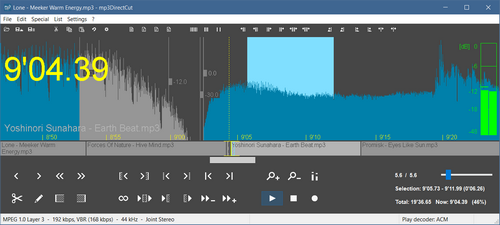


mp3DirectCut is a compact audio editor and recorder for working with compressed MP3 files. It is suited to people who need to trim recordings, divide long audio into tracks or adjust levels without converting the source to an uncompressed format first. Its editing approach leaves audio data encoded, avoiding a new encode during supported operations and preserving the original audio quality.
The editor displays MPEG audio visually so users can navigate through a file and locate sections for editing. Cut, copy and paste operations let them remove unwanted passages or rearrange sections, while trim and crop tools help retain a chosen part of a recording. Volume controls include changing level, normalization and fades, useful for balancing audio or shaping the beginning and end of a track. Fast playback and loop playback help check a selection before making changes.
For dividing longer recordings, mp3DirectCut can use cue sheets, detect pauses or split tracks at set time intervals with Auto cue. Track splitting can create filenames and tags for the resulting files, reducing manual work after a recording has been separated. Batch processing applies supported operations to multiple files, while the ID3 tag editor handles ID3v1.1 information and the program can keep ID3v2 tags. A bitrate display and VU meter provide additional information during editing and recording.
The built-in recorder captures audio input and creates MP3 files as the audio arrives, using ACM or the LAME encoder. This supports direct capture as well as editing existing files in one application. Command-line use offers an alternative for scripted or repeatable tasks, and Unicode support helps when filenames or tag text use a wider range of characters. The program also supports AAC and MPEG Layer II audio, including Layer II material used in DVD and DVB audio.
mp3DirectCut is freeware for Windows, with support listed for Windows versions through Windows 10. It is a focused choice for editing compressed audio rather than a general multitrack production environment: its tools center on file-level cuts, level changes, recording and track division. Because edits can be made without decompressing and re-encoding MP3 audio, the workflow can save processing time and avoid generation loss associated with repeated encoding.