Advanced File Shredder
Advanced File Shredder is a Windows file-erasure application from Ashkon Technology LLC for users who need to remove important or sensitive data that may otherwise be ...

Prevent is a freeware Windows utility that blocks common file-management actions, including Cut, Copy, Paste, Delete, renaming, Copy To, Move To and Send To. It can gray out related context-menu commands, disable Ctrl+C and Ctrl+V, and interfere with ending processes through Task Manager. A configurable hotkey can stop all Prevent processes. It is designed for shared computers where users want to discourage accidental or casual changes to files; it is not a replacement for Windows account permissions or backups.
| Author: | The Windows Club |
| License: | Freeware |
| Price: | FREE |
| Released: | Jun 1, 2013 |
| File size: | 358 kB |
| Downloads: | 318 |
| Keywords: | file protection, Windows 10 utility, Prevent System Program Files folder, restrict file operations, Windows, block task manager end process, prevent file renaming, Prevent folder, The Windows Club, Prevent processes, disable copy paste, shared pc file protection, folder security, anti-deletion tool, block file deletion, Prevent software |
| Author URL: | https://www.thewindowsclub.com/ |
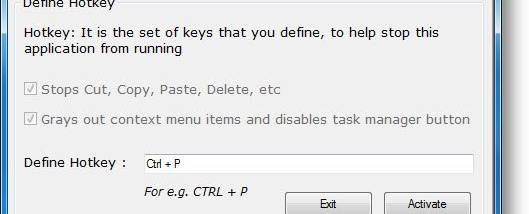

Prevent is a small Windows utility for limiting common ways files and folders can be changed or removed. It is intended for situations where a computer is shared and someone needs to make everyday file operations harder to perform accidentally or casually. Rather than managing permissions for individual files, it blocks selected actions while the utility is running.
The program can stop Cut, Copy, Paste, Delete, Copy To, Move To and Send To operations, and it can prevent renaming. These controls are useful when a user wants to reduce changes made through Windows file-management workflows. Prevent also disables or grays out related context-menu commands and keyboard shortcuts such as Ctrl+C and Ctrl+V, so the restrictions apply across more than one way of invoking an action.
Prevent also targets process termination through Task Manager. It disables the End Process button and the corresponding right-click command for a process name, and can stop a process. The application includes multiple Prevent components and configurable hotkeys: a user-defined key can terminate all Prevent processes together, while Win+F8 and Win+F9 are assigned to stop the two named components. Setting and remembering the configured key is important because it provides the way to stop the utility's restrictions.
The utility may suit a shared home PC where a user wants to discourage file deletion, renaming or copying, or a controlled-use computer where common file operations should be temporarily restricted. Its controls address specific Windows actions; they are not a substitute for account permissions, backups or other measures for protecting important data. Users should test the restrictions with nonessential files before relying on them in a shared workflow.
Prevent is freeware. Its installer places a Prevent folder in Program Files and creates a desktop shortcut. Removal is available through the included uninstaller or Control Panel, and the program folder can also be deleted. The published compatibility list covers Windows Vista, 7, 8 and 10, including their x64 editions; Windows 11 support is not established here.