Top Process Monitor
Top Process Monitor is a lightweight Windows gadget for users who ... settings. Visual and interaction options let users adapt the monitor to their workflow. A color indicator highlights processes ...

Rainmeter is an open-source Windows desktop customization tool that displays configurable panels called skins. Skins can show clocks, calendars, weather, system readings, RSS content, or application shortcuts, depending on their design. Users can load and arrange ready-made skins, adjust their appearance, and edit configuration files to build more tailored layouts. It is useful for both desktop personalization and keeping selected information visible at a glance.
| Author: | Rainy |
| License: | Open Source |
| Price: | FREE |
| Released: | Oct 14, 2026 |
| File size: | 2.50 MB |
| Downloads: | 2070 |
| Keywords: | Rainmeter customization, Rainy developer, system monitoring tool, desktop enhancement, monitor, desktop customization tool, performace monitor, performance meter, rainmeter skins, CPU load, desktop launcher skin, viewer, interactive skins, desktop system monitor, rainmeter clock skin, windows desktop widgets, real-time data display, displayer |
| Author URL: | https://www.rainlendar.net/ |

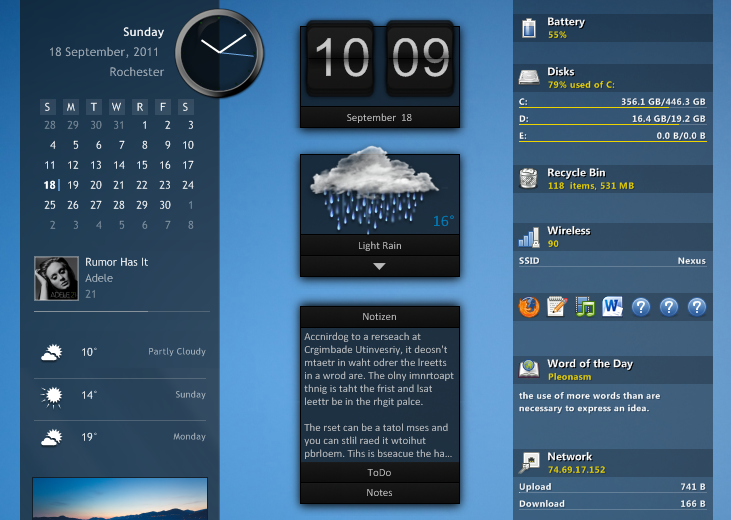



Rainmeter is an open-source desktop customization program for Windows. It displays small, configurable panels called skins on the desktop, letting users add useful information and controls without opening separate applications. It suits people who want to personalize the appearance of their desktop as well as those who want quick access to system readings, feeds, or shortcuts.
Skins can show clocks, calendars, weather, system information, and other content, depending on how each skin is built. System-monitor skins can display details such as processor or memory usage, while a launcher skin can provide clickable shortcuts to applications or files. Users can install skins made by others, then load and arrange them through Rainmeter's management interface. Individual skins can be moved and adjusted so that they fit around desktop icons and other windows.
For more tailored setups, Rainmeter supports editing skin configuration files and writing measures and meters that define what a skin reads and displays. Data can come from sources such as system information, RSS feeds, and web content, with the exact options depending on the skin and its plugins. This makes it possible to combine several small panels into a desktop layout that presents selected information at a glance. Users can also disable or unload skins they no longer need, rather than keeping every panel active.
Rainmeter is used for both visual customization and practical desktop workflows: a user might place a clock and calendar in one corner, keep resource readings visible while working, or group frequently used shortcuts in a launcher. Skins vary in complexity and appearance, so a basic setup can rely on ready-made panels, while advanced users can edit or create configurations to control their behavior and presentation.
Rainmeter is free and open source, and it is available for Windows 10 and Windows 11. Its actual resource use depends on the skins and plugins in use, so a simple layout may have a different footprint from one that frequently updates feeds or performs more complex tasks. Community-made skins and guides provide ways to explore additional layouts and configuration techniques.