Camfrog Video Chat
Camfrog Video Chat is a desktop video-chat program for people who want to join group ... talk one-on-one. It combines text messaging with live webcam and audio features, letting participants communicate in public ...

RGS-AvaCam captures photos and video from webcams and other connected video devices. It supports interval snapshots, burst mode and motion-triggered image saving, plus AVI recording with available compression. Users can view multiple devices, resize or maximize the preview, review images in built-in tools, and print snapshots. Remote monitoring and scheduled capture controls support unattended use.
| Author: | RGS-AvanceSoft |
| License: | Freeware |
| Price: | FREE |
| Released: | Nov 12, 2014 |
| File size: | 1.02 MB |
| Downloads: | 342 |
| Keywords: | video capture software, remote webcam monitoring, video device, motion detection webcam, Windows 10 compatible, webcam, interval photo capture, RGS-AvanceSoft, video, webcam capture, capture snapshot, webcam video recorder, webcam snapshot tool, webcam snapshot, RGS-AvaCam, snapshot, snapshot software, real-time video |
| Author URL: | http://users.belgacom.net |
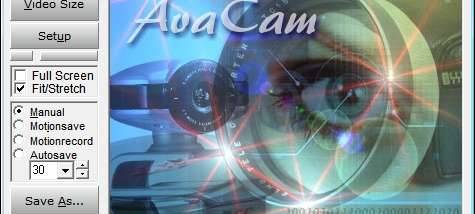

RGS-AvaCam is a webcam and video-capture utility for people who want to monitor, photograph or record video from devices connected to a PC. It works with webcams and other video devices, and can display more than one device. The interface brings live viewing, capture controls and device settings together, making it useful for both occasional snapshots and unattended monitoring.
For still images, AvaCam captures the video stream as JPG, JPEG or BMP files. Burst mode takes a series of photographs, while AutoSave stores a snapshot at a chosen interval. Motion detection can trigger an image capture when movement appears in the frame, reducing the need to watch a feed continuously. Saved JPG images can use a selected compression quality, and the program can add the date and time to snapshots. Basic image effects help adjust a capture before it is shared or printed.
AvaCam also records video to AVI files, using compression available on the computer. The preview can be stretched or fitted to the screen and enlarged to full-screen view. Its built-in viewer, editor, player and browser provide tools for reviewing captures, making simple changes and navigating saved files. Snapshots can be copied, printed or checked in print preview, with printer settings available before producing a hard copy. Users can also set a preferred external viewer or paint program, including support for IrfanView.
For monitoring, the program supports remote viewing over a local network or the internet. AutoSave and motion detection can be scheduled to turn on or off at selected times, which suits tasks such as checking a room or keeping an eye on a video source while away from the computer. Multiple copies of AvaCam can run with separate configurations, allowing different devices or monitoring jobs to use their own settings.
RGS-AvaCam is freeware for Windows, with support listed through Windows 10. It relies on a connected video device and its available driver features; device controls depend on what the hardware exposes. Video recording options likewise depend on the compression codecs installed on the PC. The program is suited to straightforward capture and monitoring workflows where interval snapshots, motion-triggered images, AVI recording and basic review or printing are more important than advanced video editing.