CrossHair
... for placing a visible reference point on the screen. It draws two full-screen lines that intersect at ... crosshairs follow the pointer as it moves between screen areas and windows. Pressing the same shortcut hides ...

Screen Markers is a desktop utility for creating crosshair marker lines that act as visual guides on the screen. Users can save any number of lines and return to them when repeating an alignment or positioning task. It is useful for arranging windows or other on-screen elements consistently without relying on memory or visual estimation. The program is freeware and supports Windows 10 and Windows 11.
| Author: | RollingData |
| License: | Freeware |
| Price: | FREE |
| Released: | Sep 28, 2023 |
| File size: | 2.00 MB |
| Downloads: | 409 |
| Keywords: | crosshair screen guides, marker, screen alignment tool, create, crosshair lines, save screen markers, efficient functionality, screen marker utility, screen, Windows 10 compatibility, desktop positioning guide, screen marking tool, RollingData Screen Markers, x64 software, user-friendly interface |
| Author URL: | http://www.rollingdata.com/ |
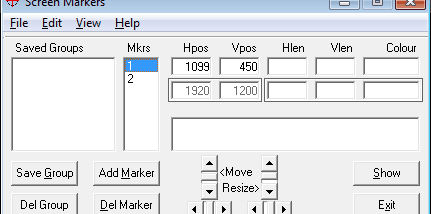

Screen Markers is a lightweight desktop utility for creating crosshair marker lines on the screen. It is intended for people who need visual guides when aligning windows, objects, or other on-screen elements, especially when they want to return to a position used before. Rather than relying on visual estimates alone, users can place markers as references for repeated layout tasks.
The main feature is the ability to create marker lines and save them. Saved lines can be kept for later use, allowing the same screen positions to be recalled instead of recreated from memory. This can help when arranging items that need to line up with one another or when a familiar placement must be reproduced during another session.
Screen Markers supports saving any number of lines, making it suitable for keeping different screen references for separate tasks. The markers function as visual guides: they show where an alignment should occur, while the user moves or positions the relevant on-screen content. The utility focuses on this direct purpose rather than serving as a general desktop customization or image-editing tool.
Typical uses include positioning windows consistently, lining up elements during design or editing work, and matching an object to a location used previously. It can also be useful whenever a fixed visual reference makes repeated placement easier. The saved lines provide continuity between uses, so the same guides can support recurring tasks.
Screen Markers is freeware from RollingData and is available for Windows, including Windows 10 and Windows 11. Its core function is screen-based alignment with saved crosshair lines; no additional workflow or specialized hardware is required by the stated purpose of the program.