Focusky Presentation Maker
Welcome to the world of innovative presentations with the Focusky Presentation Maker, a revolutionary software developed by focusky.com. This Windows 10 compatible software is designed to transform your ideas into ...

SmartDraw is a diagramming program for creating business visuals such as flowcharts, organizational charts, floor plans, project diagrams and technical illustrations. Templates and built-in symbol libraries help users assemble diagrams without drawing each element manually. It also supports direct chart editing, image import and printing options for large or scaled drawings. Completed visuals can be sent to Microsoft Word, Excel or PowerPoint, making it useful for reports, presentations and planning documents.
| Author: | SmartDraw.com |
| License: | Trialware |
| Price: | $197.00 |
| Released: | May 20, 2024 |
| File size: | 60.00 MB |
| Downloads: | 515 |
| Keywords: | draw map, diagrams, draw, process mapping software, presentation, image editor, graphic, SmartDraw.com product, flowchart creator, chart and graph creator, diagramming tool, organizational chart maker, create, Windows 10 compatible, business diagram software, maps, SmartDraw software, floor plan designer, floor plan drawing tool |
| Author URL: | https://www.smartdraw.com/ |
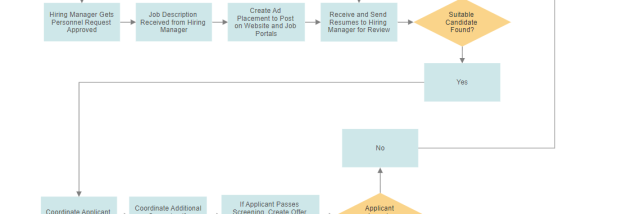

SmartDraw is a business diagramming and visual communication program for managers, teams and other users who need to present processes, structures or plans without relying on specialist graphic-design skills. It provides templates and symbol libraries for creating flowcharts, organizational charts, floor plans, project visuals, technical diagrams, calendars and other business graphics. Users can start with a suitable layout and adapt it rather than drawing every element from scratch.
Templates guide the structure of common visuals, while built-in graphics can be placed directly on the drawing area. Flowchart tools help map steps and decisions in a workflow; organization-chart layouts show reporting structures; and decision trees or cause-and-effect diagrams organize related information. For charts and graphs, users can enter values directly into the visual or adjust bar lengths to represent data, without first preparing a spreadsheet. Specialized symbols and illustrations support technical, legal and healthcare diagrams.
The drawing area can be extended for large plans and posters. Printing options include fitting a drawing onto one sheet, printing it across multiple pages, working to scale or printing at actual size, depending on the document and printer. Images and photographs can be imported or pasted into a drawing, then cropped, resized and adjusted for color and brightness. This makes it possible to combine labels, diagram elements and visual references in one document, such as adding staff photos to an organization chart.
SmartDraw also supports workflows involving Microsoft Office: drawings can be sent to Word, Excel or PowerPoint, and content can be copied between SmartDraw and Office documents. These options are useful when a diagram needs to appear in a report, presentation or spreadsheet alongside other project material. Built-in tutorials provide guidance for users learning diagram conventions or exploring the program's different visual types.
SmartDraw is trialware for Windows, with support for 64-bit Windows 10 and Windows 11. It is suited to creating and printing business visuals for planning, documentation, communication and presentations. The range of templates and graphics makes it useful across general office work as well as more specialized diagramming tasks; the available features and integrations can depend on the installed environment and compatible software.