SunlitGreen PhotoEdit Portable
SunlitGreen PhotoEdit Portable is a lightweight photo editor for users ... its own rather than as part of the SunlitGreen BatchBlitz suite, making it suitable for quick edits ...

SunlitGreen PhotoEdit is a lightweight freeware image editor for viewing and enhancing photos. It opens files by drag and drop and includes zoom controls, resizing, rotation, editable saved selections, automatic and channel-based color correction, previewable adjustments and image filters. It can be used independently or as part of the SunlitGreen BatchBlitz suite.
| Author: | SunlitGreen Software |
| License: | Freeware |
| Price: | FREE |
| Released: | Sep 6, 2023 |
| File size: | 1.07 MB |
| Downloads: | 439 |
| Keywords: | image selection editor, lightweight photo enhancer, edit, image editing, photo, photo editor, user-friendly interface, free photo editor, photo filters, resize and rotate photos, SunlitGreen Software, Windows 10 compatible, image color correction, image editor, image optimizer, PhotoEdit, editor |
| Author URL: | http://www.sunlitgreen.com/ |
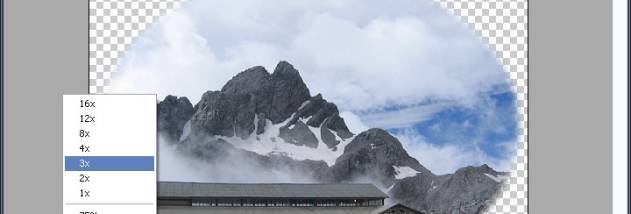

SunlitGreen PhotoEdit is a lightweight photo editor for users who need to view and make practical adjustments to image files without relying on a larger graphics suite. It can be used on its own; it is also included in the SunlitGreen BatchBlitz suite. Its tools cover basic image handling, color correction and visual effects, making it suitable for everyday photo touch-ups and simple editing tasks.
Images can be opened by dragging and dropping them into the program, then inspected with the built-in photo viewer and zoom controls. The editor can resize and rotate photos, helping prepare images for different layouts or correct their orientation. Selections can be created and edited, then saved for use in the editing workflow. These tools provide a way to focus adjustments on a chosen part of an image rather than treating every edit as a whole-photo change.
For tonal and color work, PhotoEdit offers automatic color correction as well as advanced controls organized by color channel. Adjustments can be previewed before they are applied, which helps compare a change with the original image and refine the result. Image filters add special effects, while the combination of viewing, selection and adjustment tools supports a straightforward process: inspect a photo, make changes, review the preview and save the result.
The program is intended for users who want a compact tool for common photo edits, such as rotating or resizing an image, correcting its colors, or applying a filter. It can also serve as a basic companion for browsing and preparing photos before using them elsewhere. The feature set is focused on image viewing and enhancement rather than presenting itself as a full professional graphics or batch-processing suite.
SunlitGreen PhotoEdit is freeware and can be used independently of BatchBlitz. It is available for Windows, including Windows 10 and Windows 11, as well as older Windows releases. Its small footprint suits systems where a lightweight editor is preferred. The program provides core editing operations in one place, with previewable adjustments and saved selections supporting more deliberate edits without requiring a complex workflow.